About 75 Hard Challenge Tracker
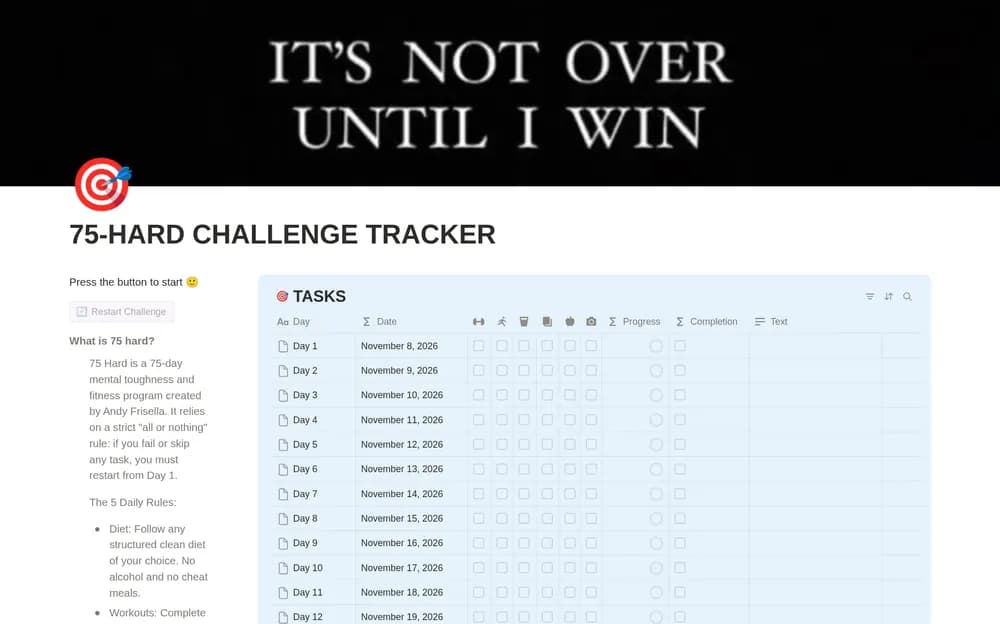
Track all 75 Hard tasks in Notion with a daily checklist, a 75-day progress view, and buttons that set real dates when you start or restart.
What’s included
- Daily checklist for two workouts, diet, water, reading, and a progress photo
- 75-day progress view
- Start Challenge button that sets Day 1 to today
- Restart button that resets the challenge with fresh dates
How to use it in practice
Duplicate the tracker and press Start Challenge on the day you begin. Check off each task every evening for the first week, including the outdoor workout and the progress photo. Look at the progress view at the end of the week, and test the restart button on a spare copy first if you want to see exactly what it resets.
Set it up in your workspace
- Open the original Notion Marketplace listing and add the template to your chosen workspace while signed in. Keep its example records until you understand how the pages connect.
- Duplicate the tracker and press Start Challenge on the day you begin.
- Try one complete example before adding a large backlog. Check that its views and any calculations show what you expect, then replace the sample content with your own.
Who it suits and what to consider
People taking on 75 Hard, especially for the first time, who want a simple daily checklist. The diet and progress-photo tasks appear to be checklist items, so keep meal notes or photos elsewhere if you need them. It follows the standard 75 Hard tasks and would need editing for a modified version.