About Daily Affirmations & Morning Dashboard
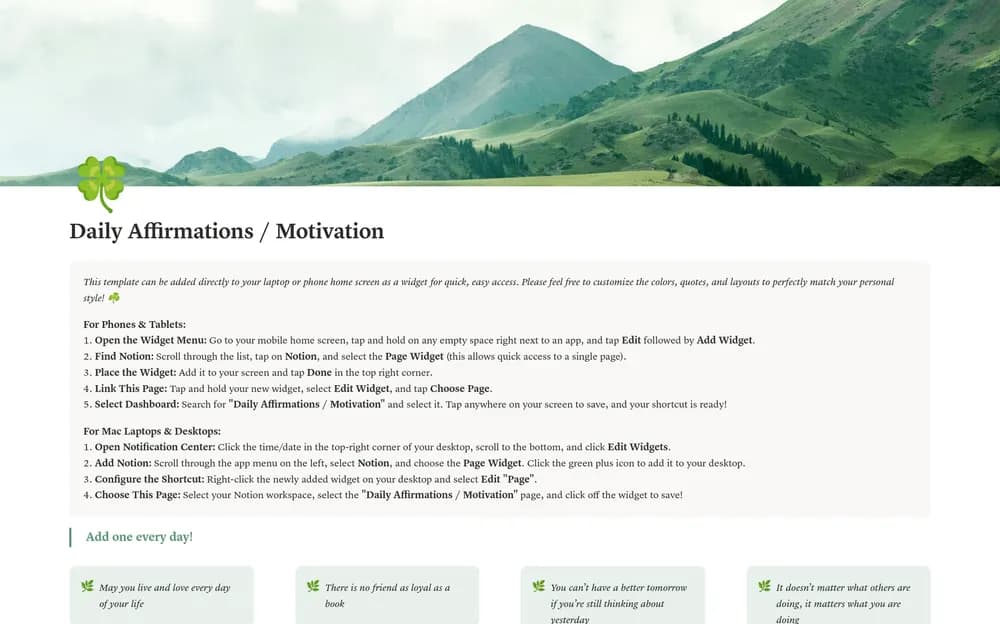
Start each morning with a calm Notion dashboard of 30+ affirmations, a short to-do list, a shopping list, and phone or laptop widget setup steps.
What’s included
- 30+ prefilled affirmations on self-love, focus, confidence, and stress
- To-do checklist for daily tasks
- Grocery and shopping list
- Widget setup instructions for phones and Mac laptops
- Nature-inspired design with leaf accents and a mountain scene
How to use it in practice
Read through the affirmations and delete any that do not resonate, adding a few in your own words. Follow the widget instructions so the page is one tap away on your phone. Each morning for a week, read the affirmations, then write no more than three tasks on the to-do list. Note at the end of the week whether opening the page became a habit or felt like one more chore.
Set it up in your workspace
- Open the original Notion Marketplace listing and add the template to your chosen workspace while signed in. Keep its example records until you understand how the pages connect.
- Read through the affirmations and delete any that do not resonate, adding a few in your own words.
- Try one complete example before adding a large backlog. Check that its views and any calculations show what you expect, then replace the sample content with your own.
Who it suits and what to consider
Students and young professionals who want a gentle, quick-glance page to open before the day begins. The page includes a request form promoting the creator’s custom template service. Home-screen widgets depend on your device and the Notion app, so setup may differ from the instructions.