About Grade Tracker
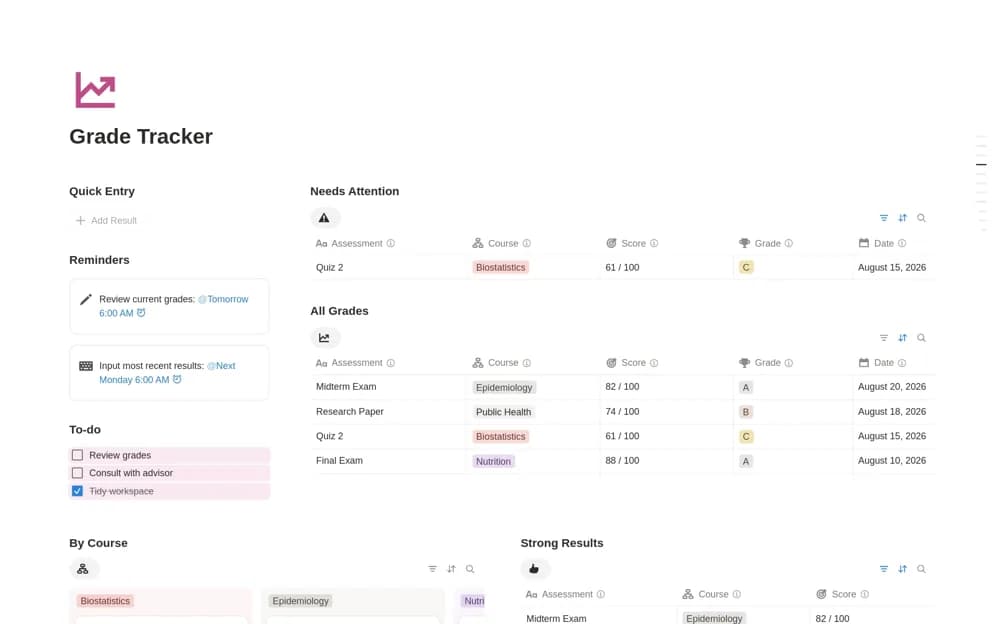
A straightforward results table with course, assessment, score, grade, and date, plus views highlighting strong results and those that may need attention.
What’s included
- Assessments organized by course
- Score, grade, and date fields
- Needs Attention and Strong Results views
How to use it in practice
Enter a few returned assessments with their course names and dates. Compare the attention view with your own understanding of where you need help, then plan a concrete review task for one result. Keep the official feedback linked or noted beside the score for context.
Set it up in your workspace
- Open the original Notion Marketplace listing and add the template to your chosen workspace while signed in. Keep its example records until you understand how the pages connect.
- Enter a few returned assessments with their course names and dates.
- Try one complete example before adding a large backlog. Check that its views and any calculations show what you expect, then replace the sample content with your own.
Who it suits and what to consider
Students who want to record returned work without configuring a more elaborate grading system. The source describes recording and reviewing results. It does not confirm weighted final-grade calculations, so choose a dedicated calculator if that is your main requirement.