About Study Abroad — Application & Journey Tracker
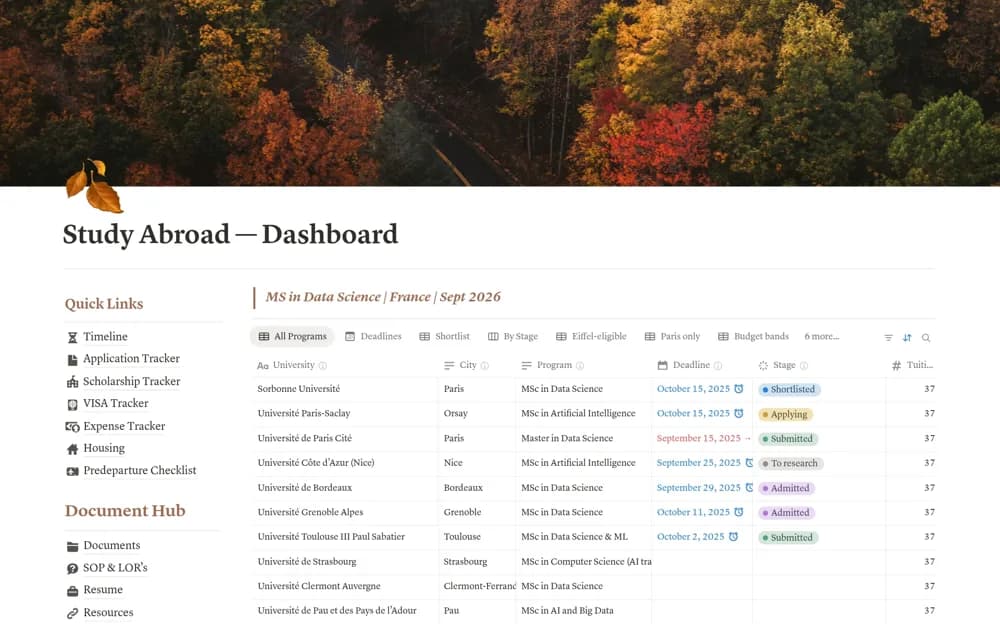
A study-abroad planner for applications, scholarships, visa-related tasks, expenses, housing, and departure preparation.
What’s included
- Application deadlines, program details, and stages
- Scholarship, visa, expense, and housing trackers
- Document links, tasks, and a pre-departure checklist
How to use it in practice
Enter current university deadlines and link official application instructions. Keep visa and travel questions dated and verify them through the relevant authorities or qualified advisers. Review sharing settings for personal documents and adapt the France-focused examples to your intended destination.
Set it up in your workspace
- Open the original Notion Marketplace listing and add the template to your chosen workspace while signed in. Keep its example records until you understand how the pages connect.
- Enter current university deadlines and link official application instructions.
- Try one complete example before adding a large backlog. Check that its views and any calculations show what you expect, then replace the sample content with your own.
Who it suits and what to consider
Prospective international students organizing several application and travel workstreams. The creator’s destination and document examples are organizational prompts, not current immigration or admission advice.