About Weighted Grade Calculator
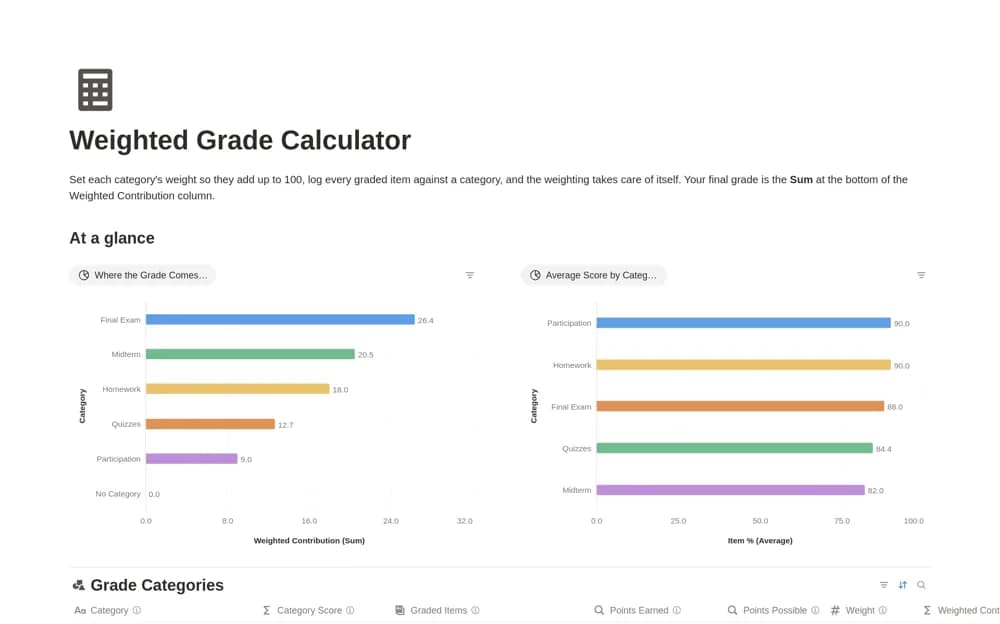
A course grade tracker using assessment categories, point totals, and category weights to calculate a running weighted result from the work you enter.
What’s included
- Weighted assessment categories
- Points earned and points possible
- Category rollups and weighted grade calculations
How to use it in practice
Copy the category weights from your syllabus and confirm that they total one hundred. Enter two returned assessments and compare the calculated result with a manual example. Keep ungraded work distinguishable from a zero so the running view does not suggest a final outcome prematurely.
Set it up in your workspace
- Open the original Notion Marketplace listing and add the template to your chosen workspace while signed in. Keep its example records until you understand how the pages connect.
- Copy the category weights from your syllabus and confirm that they total one hundred.
- Try one complete example before adding a large backlog. Check that its views and any calculations show what you expect, then replace the sample content with your own.
Who it suits and what to consider
Students monitoring graded assessments against the weighting rules in their course syllabus. Check the course’s rules for dropped scores, extra credit, rounding, and ungraded work. A supplied formula may need changes for those arrangements.