About 2027 Calendar Tables
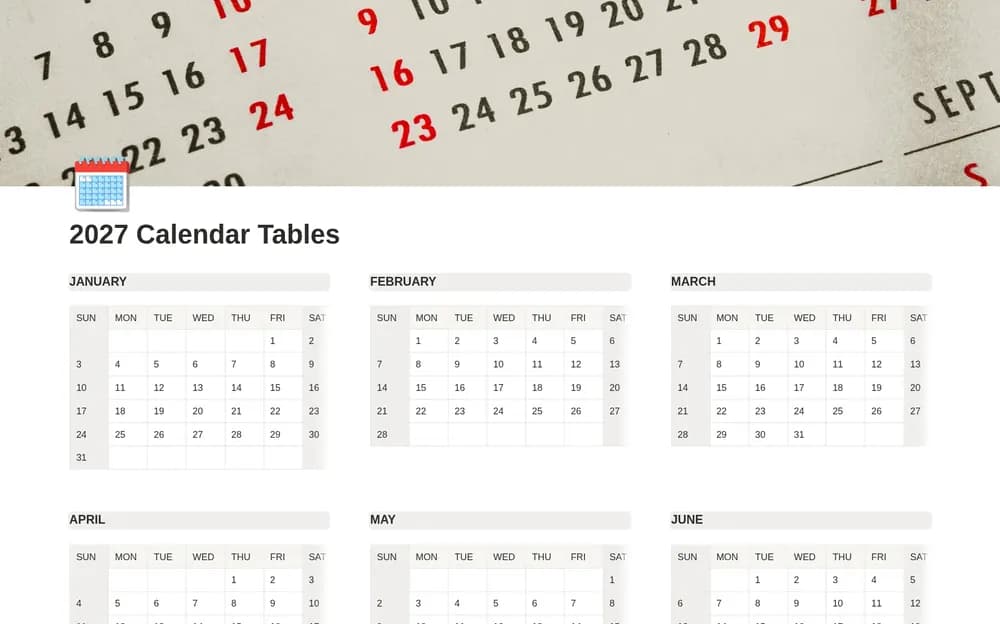
Get a 2027 calendar already laid out as Notion tables, with year, quarter, and month overviews you can highlight, annotate, or copy into a planner.
What’s included
- 2027 calendar formatted as tables
- Year, quarter, and month layouts
- Highlighting for birthdays, vacations, and key dates
- Space for links to meetings or reminders
How to use it in practice
Highlight the fixed dates you already know, such as birthdays, holidays, and planned time off. Select a block of days for an upcoming vacation and add a link to the related meeting or booking page. Each week, strike through the days that have passed, then copy the current month into your own planner if you want it beside your tasks.
Set it up in your workspace
- Open the original Notion Marketplace listing and add the template to your chosen workspace while signed in. Keep its example records until you understand how the pages connect.
- Highlight the fixed dates you already know, such as birthdays, holidays, and planned time off.
- Try one complete example before adding a large backlog. Check that its views and any calculations show what you expect, then replace the sample content with your own.
Who it suits and what to consider
Planners who want a quick, printed-style year overview inside Notion without building one from scratch. These are static tables, so dates do not create reminders or appear in Notion Calendar. It covers 2027 only, and another year would need a new copy.