About pink university workspace ♡
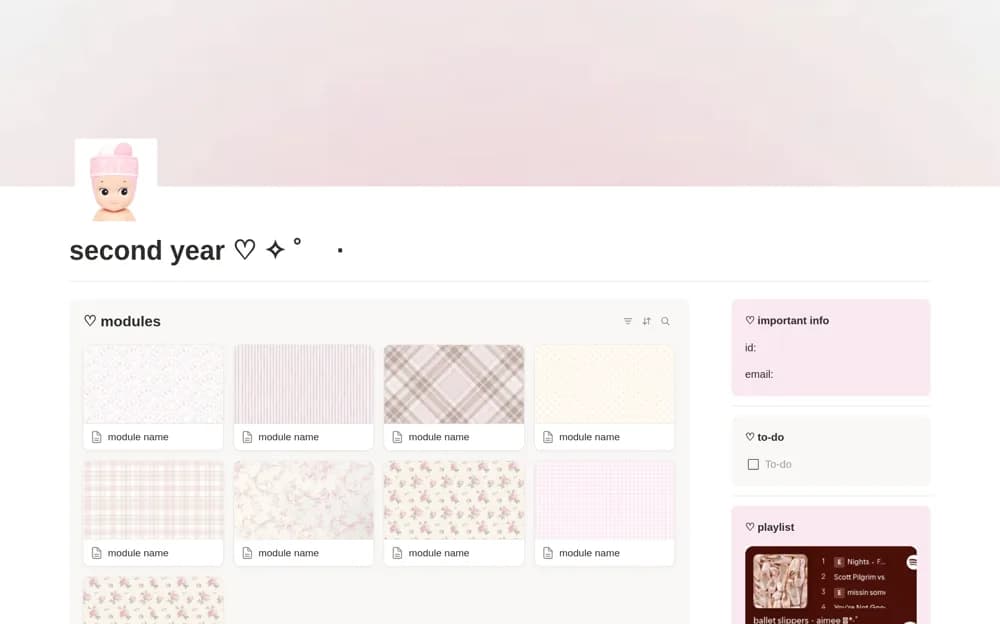
A pink university dashboard linking module notes, assignments, a revision timetable, and everyday scheduling.
What’s included
- Module dashboards with lecture and reading notes
- Assignments with due date, status, and module code
- Revision timetable, calendar, to-do list, and important-information section
How to use it in practice
Add one module and a few real assignments, then connect their preparation to your revision timetable. Test the next-deadline view during a busy week. Keep private student identifiers out of any public version of the dashboard and simplify decorative sections that interrupt navigation.
Set it up in your workspace
- Open the original Notion Marketplace listing and add the template to your chosen workspace while signed in. Keep its example records until you understand how the pages connect.
- Add one module and a few real assignments, then connect their preparation to your revision timetable.
- Try one complete example before adding a large backlog. Check that its views and any calculations show what you expect, then replace the sample content with your own.
Who it suits and what to consider
University students wanting academic organization within a decorative workspace. Useful when you want notes and coursework together; the playlist and visual style are optional parts of the experience.