About Bible Study Journal
A study journal gives a passage and your response a place to remain connected. This creator’s template offers that structure in Notion. Choose a writing rhythm that fits your practice, and keep your own reflections distinct from quoted source material.
What’s included
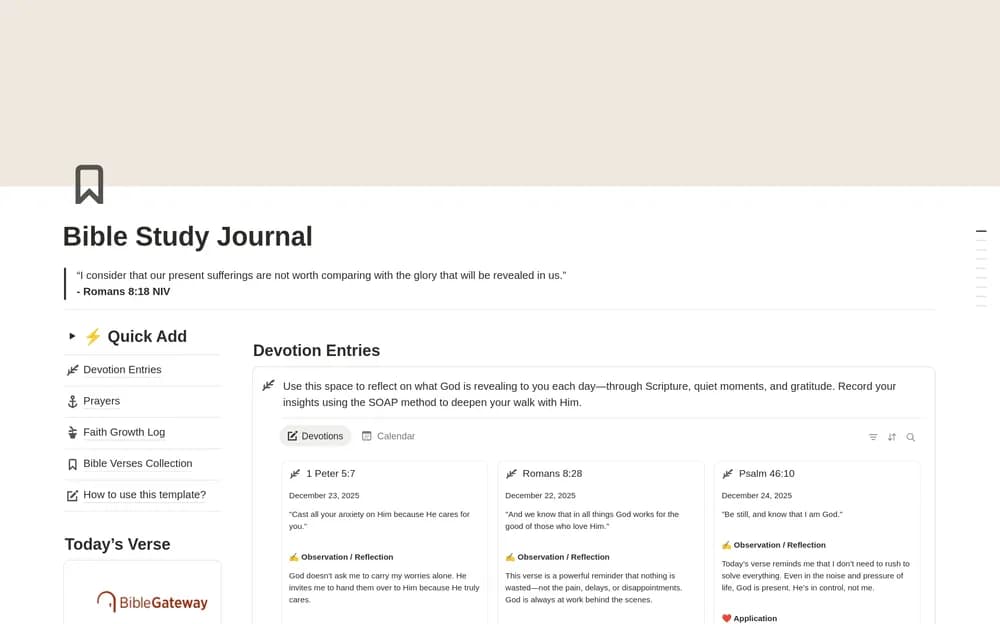
- A summary dashboard and daily devotion entries
- Prayer requests, prayer collections, and a faith-growth log
- Verse collections and Bible-reading tracking
How to use it in practice
Choose a short passage and write your own reflection using the devotion structure. Keep the passage reference and any questions beside the entry. Add prayer requests and return to them at a rhythm that fits your practice. Use the reading tracker as a record of what you have read while allowing space for slower study.
Set it up in your workspace
- Open the original Notion Marketplace listing and add the template to your chosen workspace while signed in. Keep its example records until you understand how the pages connect.
- Record one passage and a short personal reflection. Return to the entry before expanding the routine.
- Try one complete example before adding a large backlog. Check that its views and any calculations show what you expect, then replace the sample content with your own.
Who it suits and what to consider
People who want a place for scripture-study notes. A broad devotional workspace for people who want reading, reflection, and prayer records together. Adapt the sections to the practice and tradition you follow.