About Food Inventory System: Fridge & Freezer Tracker
Know what food you have and where it is stored, with a Notion pantry, fridge, and freezer inventory, stock movement history, and restock priorities.
What’s included
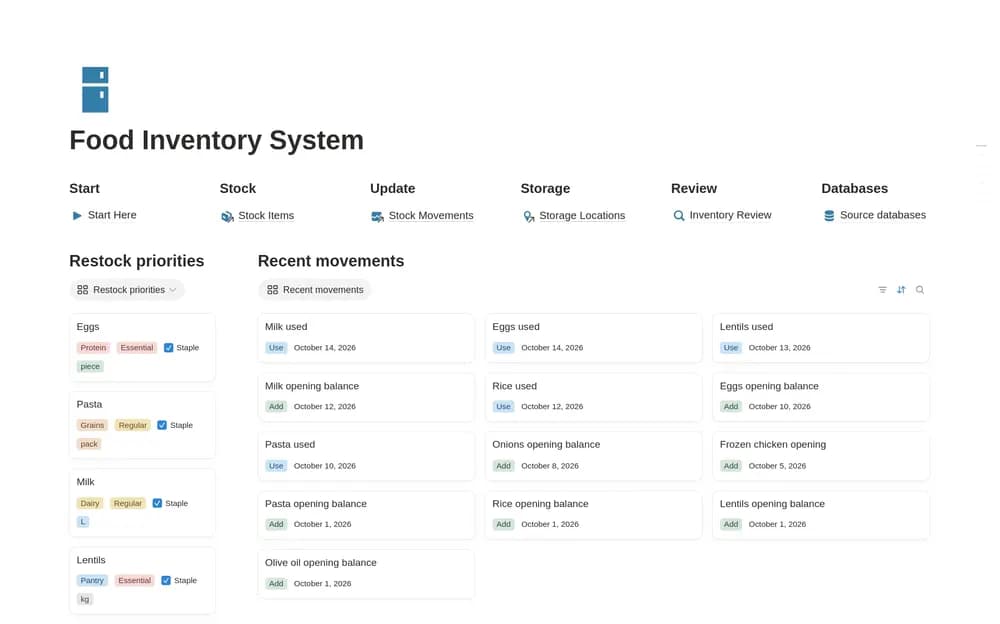
- Food inventory database by category, unit, priority, and location
- Stock Movements database for opening balances, purchases, and consumption
- Storage Map for pantry, fridge, freezer, and custom spaces
- Restock Priorities view
- Connected dashboard with inventory review
How to use it in practice
Start with the freezer, since it is often the most forgotten, and enter what is in it with units and an opening balance. Add pantry staples next and set priorities for essentials. During the week, record a stock movement whenever you use up or buy an item. Before your next grocery trip, check the Restock Priorities view and build your list from it.
Set it up in your workspace
- Open the original Notion Marketplace listing and add the template to your chosen workspace while signed in. Keep its example records until you understand how the pages connect.
- Start with the freezer, since it is often the most forgotten, and enter what is in it with units and an opening balance.
- Try one complete example before adding a large backlog. Check that its views and any calculations show what you expect, then replace the sample content with your own.
Who it suits and what to consider
Households, home cooks, and shared homes that want fewer duplicate purchases and less forgotten food. Stock levels stay accurate only if each use and purchase is logged. The listing does not mention expiry-date alerts or barcode scanning.