About Language Learning Planner
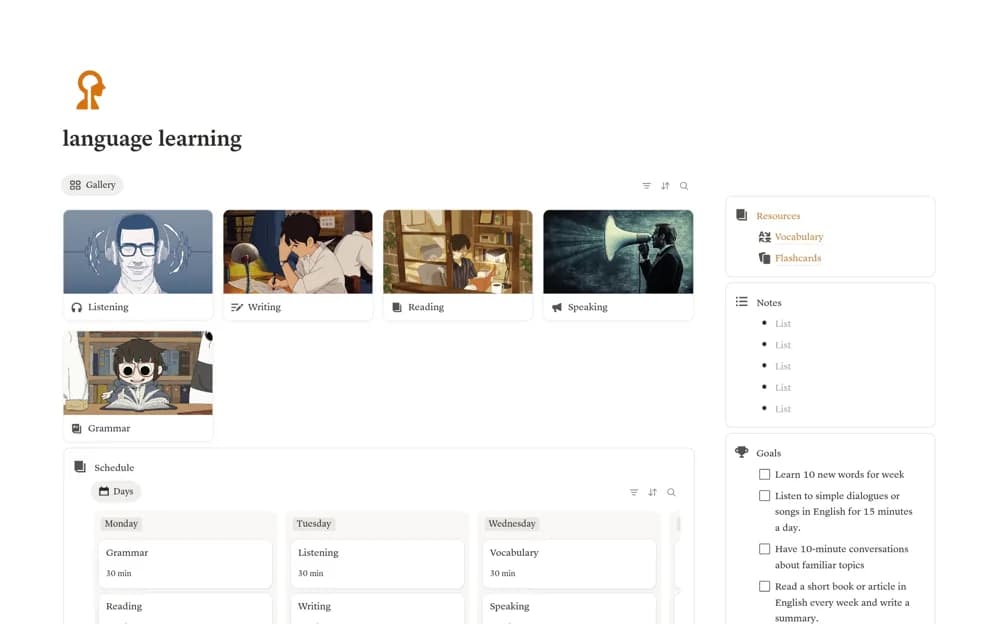
Plan language study in Notion with speaking, listening, reading, and writing sections, plus resources, notes, goals, and a calendar.
What’s included
- Language skill sections
- Study schedule and calendar
- Resource and study-note library
- Weekly learning goals
How to use it in practice
Choose a language and add the learning resources you already use. Plan a few realistic sessions across different skills, then record useful phrases or questions after each one. Review the week’s goals against actual practice and adjust the schedule before adding more material to the library.
Set it up in your workspace
- Open the original Notion Marketplace listing and add the template to your chosen workspace while signed in. Keep its example records until you understand how the pages connect.
- Choose a language and add the learning resources you already use.
- Try one complete example before adding a large backlog. Check that its views and any calculations show what you expect, then replace the sample content with your own.
Who it suits and what to consider
Independent language learners organizing their own study materials and practice routine. This organizes study rather than providing a complete language course, a conversation partner, or a validated proficiency assessment.