About Mandalart Goal Planner
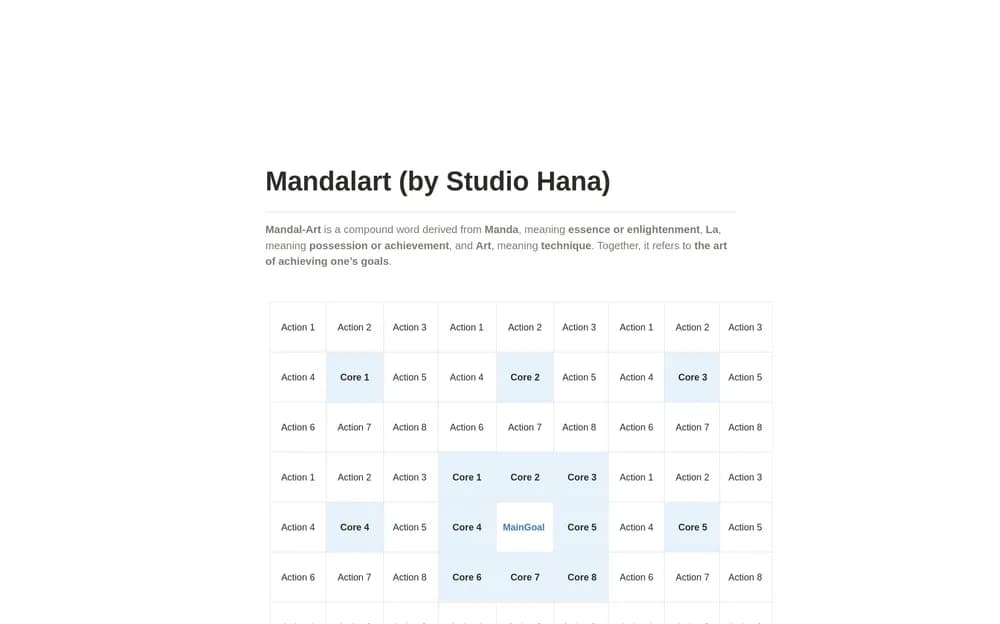
Break one core goal into eight themes and 64 concrete actions in Notion using a native 9x9 Mandalart grid with guided prompts.
What’s included
- Native 9x9 Mandalart grid
- Guided prompts for the core goal and eight themes
- Space to map supporting actions under each theme
- Clean layout usable from yearly vision to weekly action
How to use it in practice
Write one goal you care about in the center, keeping it specific enough to act on. Fill the eight surrounding themes before worrying about actions. Over the week, add actions to each theme, stopping when an idea feels like filler rather than forcing all 64. Pick two or three actions to start immediately and revisit the grid at the end of the week.
Set it up in your workspace
- Open the original Notion Marketplace listing and add the template to your chosen workspace while signed in. Keep its example records until you understand how the pages connect.
- Write one goal you care about in the center, keeping it specific enough to act on.
- Try one complete example before adding a large backlog. Check that its views and any calculations show what you expect, then replace the sample content with your own.
Who it suits and what to consider
Goal setters who think visually and want to turn a single ambition into specific supporting steps. The grid is a planning page; the listing does not describe completion tracking, deadlines, or habit logs. The creator suggests pairing it with their separate Brain Hana template for a fuller think-and-do setup.