About Personal Race Training Dashboard
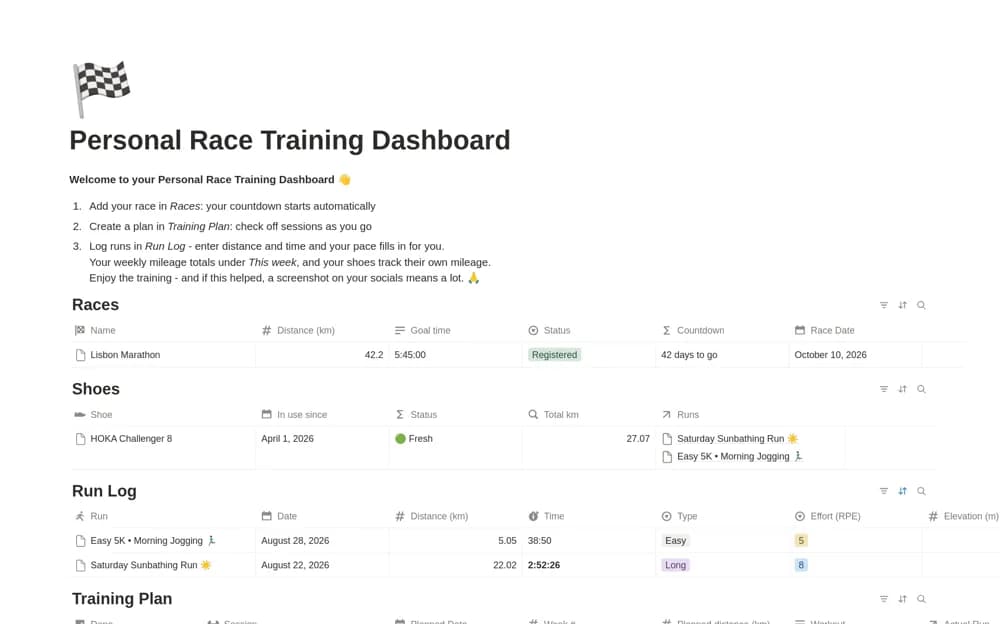
Log running sessions in Notion with calculated pace, weekly distance totals, a race countdown, goal details, and mileage for each pair of shoes.
What’s included
- Run distance and duration log
- Calculated pace and weekly mileage
- Race date, distance, and target time
- Shoe mileage records
How to use it in practice
Add a recent run with the distance and elapsed time in the expected units. Check the calculated pace, select the shoes used, and confirm the weekly total. Enter your race details separately and review the log as a record of completed activity rather than a prescription for the next session.
Set it up in your workspace
- Open the original Notion Marketplace listing and add the template to your chosen workspace while signed in. Keep its example records until you understand how the pages connect.
- Add a recent run with the distance and elapsed time in the expected units.
- Try one complete example before adding a large backlog. Check that its views and any calculations show what you expect, then replace the sample content with your own.
Who it suits and what to consider
Runners recording a training plan they already follow and keeping race details visible. This logs training rather than prescribing a safe plan. Shoe-mileage warnings are a reminder to inspect equipment, not a diagnosis of its condition.