About Workout Tracker PPL
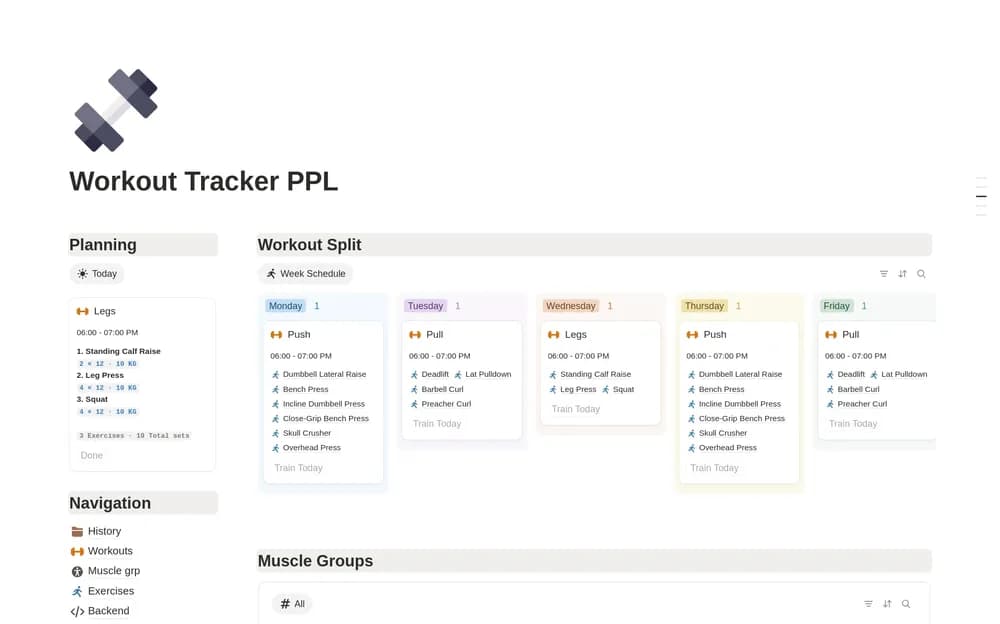
A workout record helps you remember what you actually did in a session. This template focuses on the PPL format. Check how the creator structures the log and adapt it to a routine suitable for you, with qualified guidance where needed.
What’s included
- Workout planning around a Push, Pull, Legs structure
- Exercise, set, repetition, weight, and training-day records
- Editable routines that can be adapted to other training splits
How to use it in practice
Use the log for a routine appropriate to you and record sessions consistently. Keep exercise names and units stable so later entries can be compared. Add a short note when a session changes, rather than letting the numbers lose their context. Review the log as a record of what you did and adapt the layout to the routine you follow.
Set it up in your workspace
- Open the original Notion Marketplace listing and add the template to your chosen workspace while signed in. Keep its example records until you understand how the pages connect.
- Log a session from your existing routine. Keep the details that help you review training without making the record cumbersome.
- Try one complete example before adding a large backlog. Check that its views and any calculations show what you expect, then replace the sample content with your own.
Who it suits and what to consider
People already following an appropriate PPL training plan. A fitness log for people who want session details in Notion. The template’s example split is an organizational starting point, not a personalized training prescription.