About Scholarships Tracker
A scholarship tracker is useful when the eligibility details stay connected to the deadline. Use this layout to organize opportunities, then verify each against the provider’s current information. A saved opportunity can change, so add the date you checked the source.
What’s included
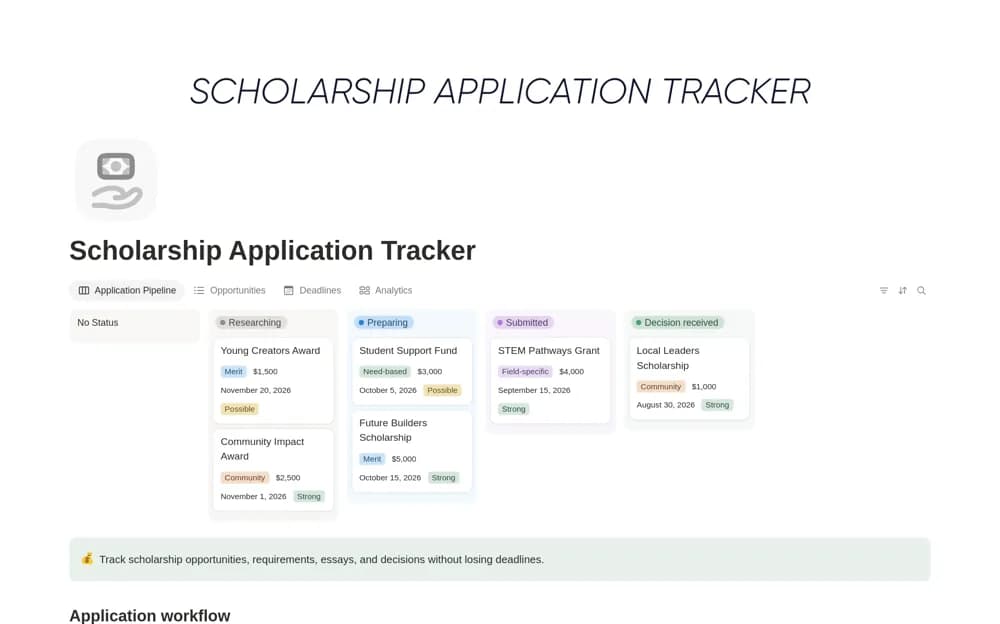
- Scholarship records with deadlines, amounts, and status
- Eligibility, document, note, and source-link context
- Stage, priority, and deadline views plus an application reflection log
How to use it in practice
Start with scholarships you are plausibly eligible for and verify their requirements at the official source. Record document and reference work early enough to complete it. Review upcoming deadlines weekly and retain the submitted version. Use the reflection log for lessons that can improve the next application.
Set it up in your workspace
- Open the original Notion Marketplace listing and add the template to your chosen workspace while signed in. Keep its example records until you understand how the pages connect.
- Add a few relevant opportunities with links to official information. Record the next document or action needed.
- Try one complete example before adding a large backlog. Check that its views and any calculations show what you expect, then replace the sample content with your own.
Who it suits and what to consider
Students planning scholarship applications. Useful for coordinating several opportunities. Check the actual reminder settings rather than assuming a visible date will produce a notification.