About Simple Daily Journal with Mood Board
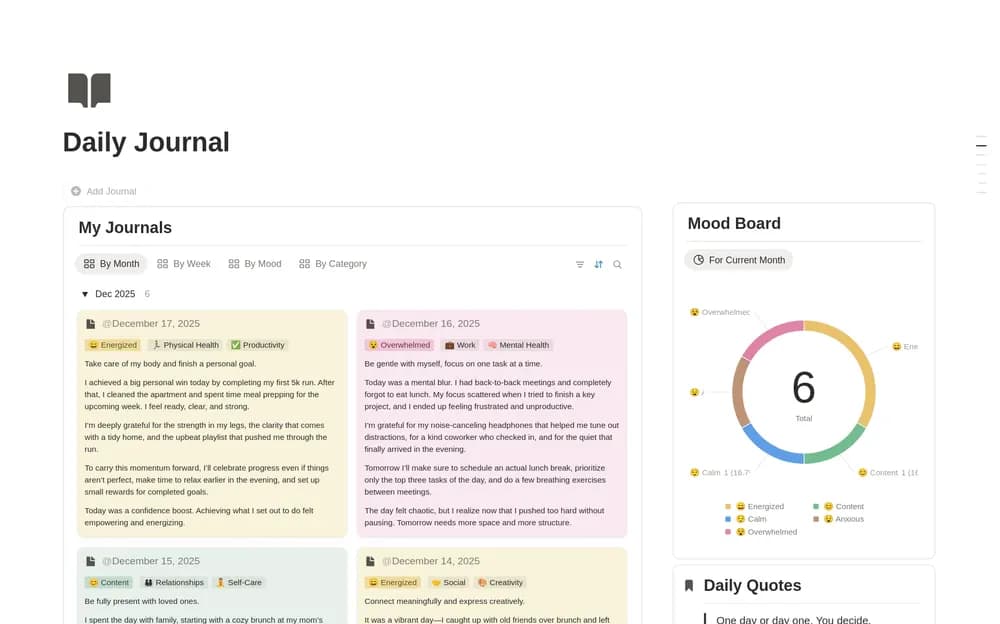
Build a steady writing habit with a distraction-free Notion journal that tracks mood, files entries by category, and shows a monthly mood board.
What’s included
- Daily entries with mood tracking
- Category organization
- Monthly, weekly, mood, and category views
- Monthly mood board overview
How to use it in practice
Pick a fixed time, such as after dinner, and write one entry per day for a week. Tag each entry with a mood and a category like work or personal. Midweek, open the weekly view to reread what you wrote. At the end of the week, look at the monthly mood board and note any pattern.
Set it up in your workspace
- Open the original Notion Marketplace listing and add the template to your chosen workspace while signed in. Keep its example records until you understand how the pages connect.
- Pick a fixed time, such as after dinner, and write one entry per day for a week.
- Try one complete example before adding a large backlog. Check that its views and any calculations show what you expect, then replace the sample content with your own.
Who it suits and what to consider
New journalers who want a clean, minimal place to write each day and glance at their mood. The listing also promotes a Notion Business plan offer that is unrelated to the journal. Beyond mood and categories, the description does not mention prompts or entry templates.