About Astrology Moon Cycle Journal & Intention Tracker
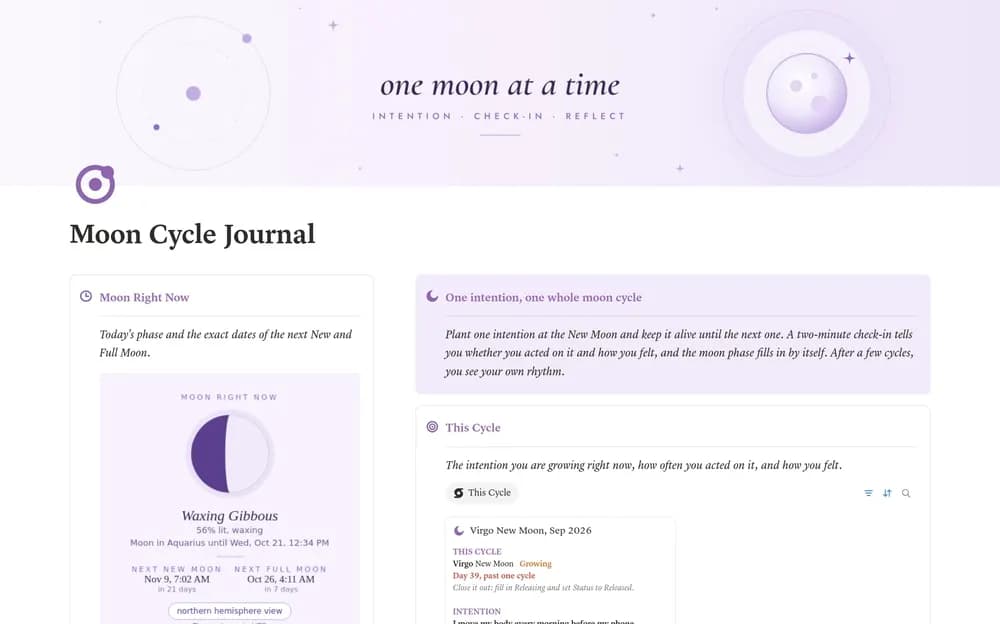
Follow one intention from New Moon to Full Moon in Notion, with quick mood and energy check-ins grouped by the moon phase they fall in.
What’s included
- Live moon widget with phase, illumination, and next New and Full Moon dates
- Two-minute check-ins for mood, energy, and intention follow-through
- This Cycle view with an On track or Drifting signal
- Check-ins grouped by phase, plus a calendar and past-cycles archive
- Plain-language guide to the eight phases
How to use it in practice
Choose a single intention and an easy opening action when the next New Moon arrives, or begin mid-cycle if you prefer. Log a check-in each day for a week, rating your mood and energy and noting if you took action toward the intention. At the end of the week, look at the This Cycle view to see whether the follow-through signal matches how the week felt.
Set it up in your workspace
- Open the original Notion Marketplace listing and add the template to your chosen workspace while signed in. Keep its example records until you understand how the pages connect.
- Choose a single intention and an easy opening action when the next New Moon arrives, or begin mid-cycle if you prefer.
- Try one complete example before adding a large backlog. Check that its views and any calculations show what you expect, then replace the sample content with your own.
Who it suits and what to consider
People who use the lunar cycle as a rhythm for reflection and want a short daily check-in habit. Phase-based patterns only become visible after two or three full cycles of check-ins. The creator presents it as a reflection and self-care tool, not financial, medical, or psychological advice.