About The Organized Uni Student Ver.2
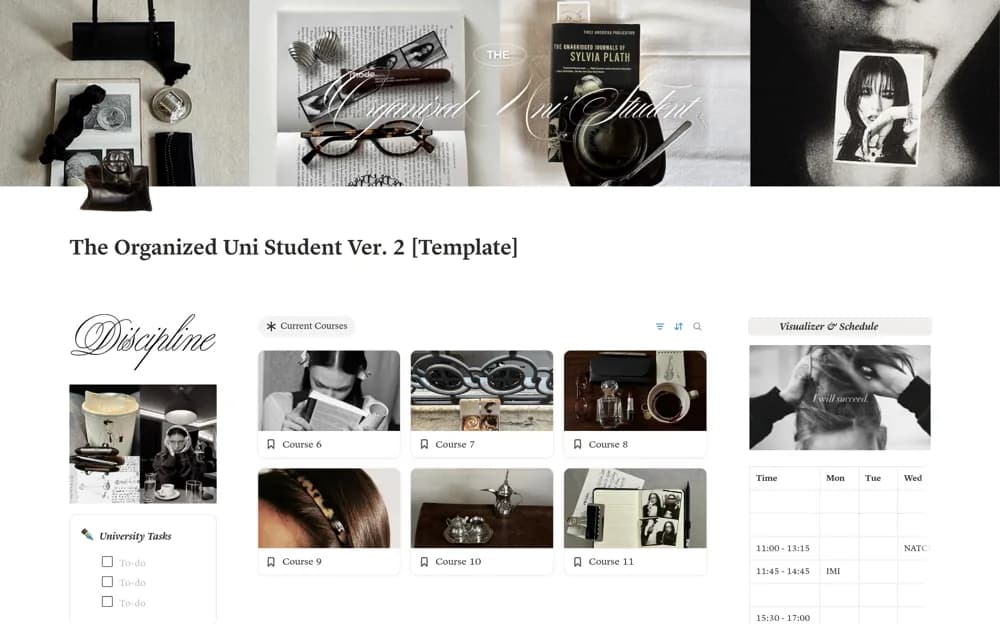
A university workspace combining courses, classes, assignments, semesters, a schedule, tasks, resources, and habits.
What’s included
- Course, class, assignment, and semester pages
- Schedule table and main task list
- Resource links and a habit tracker
How to use it in practice
Add the current semester and a small set of courses, then enter confirmed class times and assignment deadlines. Test the main task view during a busy week. Use habit tracking only where it supports your routine and keep official course information linked for verification.
Set it up in your workspace
- Open the original Notion Marketplace listing and add the template to your chosen workspace while signed in. Keep its example records until you understand how the pages connect.
- Add the current semester and a small set of courses, then enter confirmed class times and assignment deadlines.
- Try one complete example before adding a large backlog. Check that its views and any calculations show what you expect, then replace the sample content with your own.
Who it suits and what to consider
University students who want academic and daily organization in one dashboard. The public feature list does not establish automatic timetable imports or learning-platform integration.