About Video Games Library
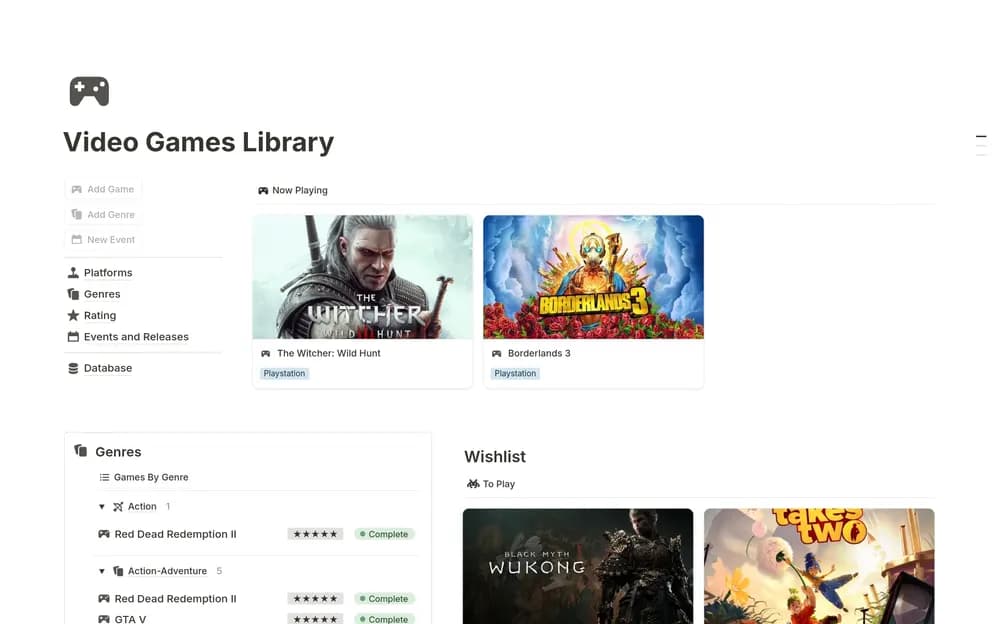
Catalog owned and wished-for games in Notion by genre, platform, play status, and personal rating, with a calendar for game events and new releases.
What’s included
- Games database with genre, platform, and status
- Personal ratings
- Wishlist section
- Calendar of game events and releases
How to use it in practice
Add the games you are currently playing and a handful from your backlog, with platform and status. Rate the ones you have finished, and move anything you want to buy into the wishlist. Put two or three release dates or events on the calendar, then review the backlog at the end of the week to pick what to play next.
Set it up in your workspace
- Open the original Notion Marketplace listing and add the template to your chosen workspace while signed in. Keep its example records until you understand how the pages connect.
- Add the games you are currently playing and a handful from your backlog, with platform and status.
- Try one complete example before adding a large backlog. Check that its views and any calculations show what you expect, then replace the sample content with your own.
Who it suits and what to consider
Gamers who want to manage a backlog, a wishlist, and upcoming releases in one place. Game details, cover images, and release dates are entered manually; the listing does not mention importing from a store or game database.