About Cute Digital Diary & Mood Journal
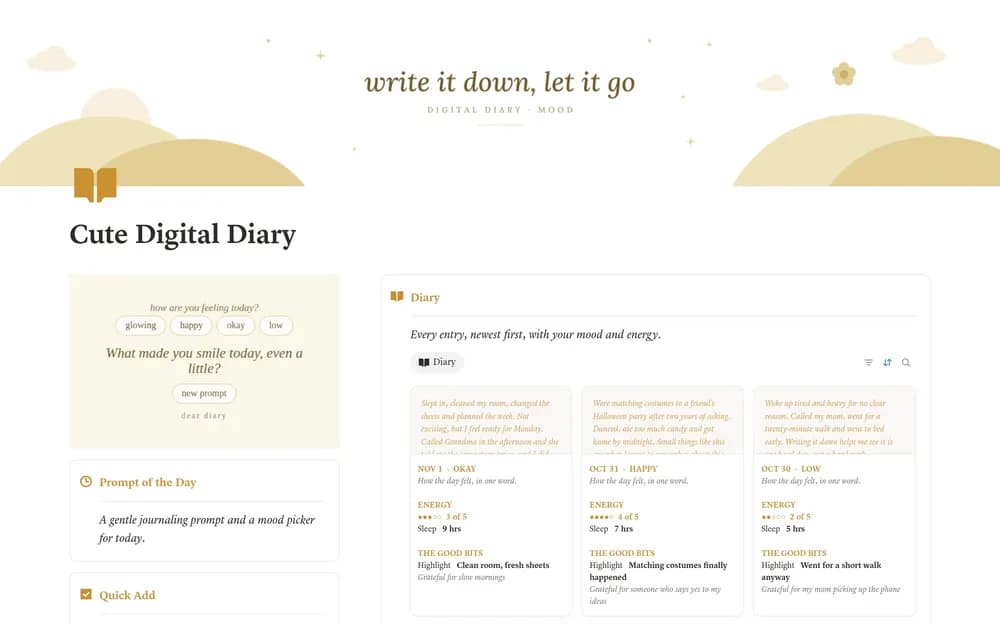
Write a daily diary in Notion with gentle prompts, a mood and energy rating, gratitude and highlights, a mood calendar, and saved favorite days.
What’s included
- Entry canvas with Today I Felt, Grateful For, and Tomorrow I Will prompts
- Mood picker and 1 to 5 energy rating
- Mood calendar, mood board grouping, and favorite days views
- Prompt of the Day widget
- Monthly look-back checklist and getting started guide
How to use it in practice
Write an entry each evening for a week, picking a mood and energy level before you start. Add one highlight and one thing you are grateful for, even on dull days. Star any day you want to remember as a favorite. At the end of the week, open the mood calendar and compare energy levels with what happened.
Set it up in your workspace
- Open the original Notion Marketplace listing and add the template to your chosen workspace while signed in. Keep its example records until you understand how the pages connect.
- Write an entry each evening for a week, picking a mood and energy level before you start.
- Try one complete example before adding a large backlog. Check that its views and any calculations show what you expect, then replace the sample content with your own.
Who it suits and what to consider
Anyone who wants a pretty, low-effort daily journal with a built-in mood tracker. The mood board is a view of entries grouped by mood, not a visual inspiration board. Mood and energy are self-reported labels rather than any kind of assessment.