About Basic Daily Planner
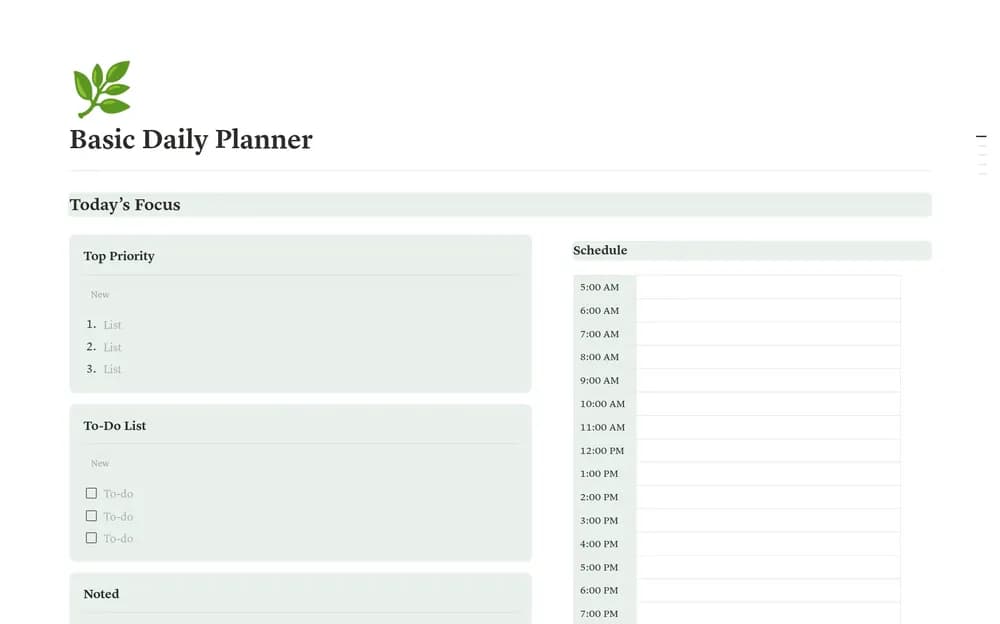
Ground each day in Notion with an hourly time-block schedule, a week-view calendar, a weekly habit grid, and a Today’s Focus list on one page.
What’s included
- Hourly time-block schedule with a reset button
- Week-view calendar
- Weekly habit-tracking grid
- Today’s Focus with one top priority, a short to-do list, and notes
How to use it in practice
Each morning, choose one top priority and list a few supporting tasks under Today’s Focus. Trim the hourly blocks to match your real schedule, and press the button to regenerate them when the day changes. Fill in the habit grid in the evening, then use the week view on Friday to see how the days connected.
Set it up in your workspace
- Open the original Notion Marketplace listing and add the template to your chosen workspace while signed in. Keep its example records until you understand how the pages connect.
- Each morning, choose one top priority and list a few supporting tasks under Today’s Focus.
- Try one complete example before adding a large backlog. Check that its views and any calculations show what you expect, then replace the sample content with your own.
Who it suits and what to consider
People who want light daily structure without learning nested databases or a large planning system. As a single-page planner with no nested databases, it does not appear to keep a searchable archive of past days. Calendar entries still need to be added by hand.