About Car Maintenance Tracker
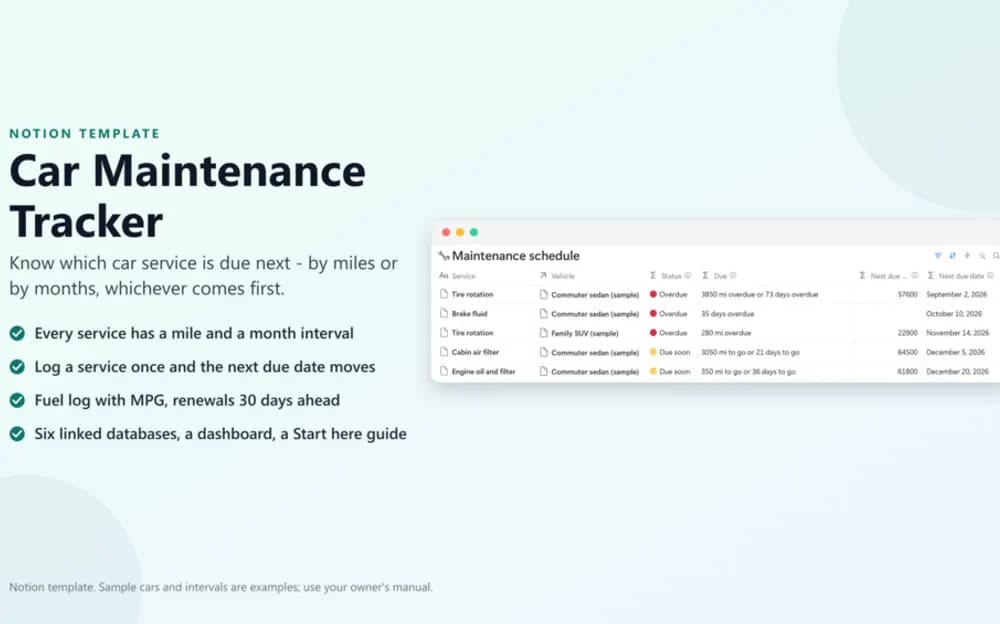
See which car service is due next in Notion by miles or months, whichever comes first, alongside service, fuel, renewal, and repair shop logs.
What’s included
- Service schedule with mile and month intervals
- Due soon and overdue status with a dashboard list
- Service log with costs and receipts
- Fuel log with MPG and cost per mile
- Insurance, registration, and inspection renewals
How to use it in practice
Add your car and its current odometer reading, then enter the intervals from your owner’s manual for a few key services. Record your last oil change in the earlier-history field so the schedule counts from it. Log a fill-up during the week to try the fuel calculations. Check the due-soon list at the end of the week.
Set it up in your workspace
- Follow the original creator’s checkout or access instructions to obtain the Notion page. Open that page while signed in, then duplicate it into the workspace you want to use.
- Add your car and its current odometer reading, then enter the intervals from your owner’s manual for a few key services.
- Try one complete example before adding a large backlog. Check that its views and any calculations show what you expect, then replace the sample content with your own.
Who it suits and what to consider
Car owners who want to follow the maintenance intervals in their owner’s manual. Odometer readings are entered manually, and fields use miles and dollars unless you rename them. Notion’s free plan displays only one of the chart views.