About Countries Database
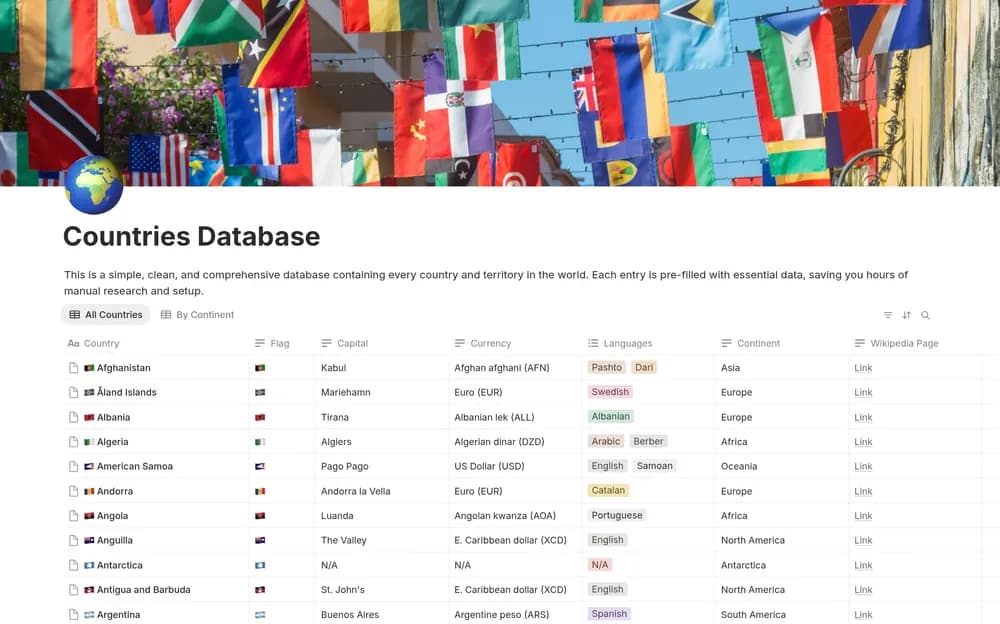
Use a ready-made Notion database of 240+ countries and territories, with capitals, currencies, languages, and flags, to relate to your own systems.
What’s included
- 240+ countries and territories
- Flag emoji, country name, and capital
- Currency, languages, and continent
- Wikipedia link for each country
How to use it in practice
Duplicate the database and add a relation to it from your trips or contacts database. Link a few records and pull the capital or currency into the related pages with rollups. Add a Visited checkbox if you travel, then check after a week whether the shared reference saves you repeated lookups.
Set it up in your workspace
- Open the original Notion Marketplace listing and add the template to your chosen workspace while signed in. Keep its example records until you understand how the pages connect.
- Duplicate the database and add a relation to it from your trips or contacts database.
- Try one complete example before adding a large backlog. Check that its views and any calculations show what you expect, then replace the sample content with your own.
Who it suits and what to consider
Travelers, students, and businesses that want country data to link into trips, contacts, or study notes. The data is a static snapshot, so currencies or capitals that change need manual updates. Relations and rollups must be set up in your own databases.