About Couples Journal: Dates, Memories & Love Notes
Save date nights, trips, milestones, and love notes as photo cards in a Notion couples journal with a days-together counter and a shared calendar.
What’s included
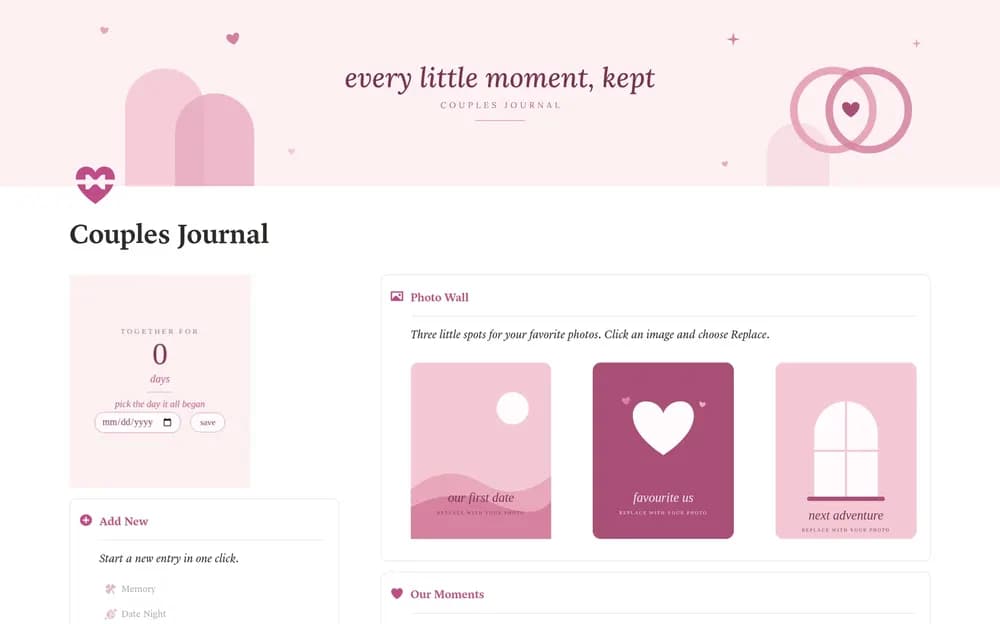
- Our Moments database for dates, memories, love notes, milestones, and trips
- Photo wall for three favorite pictures
- Days Together counter widget
- Our Calendar for planned dates
- Love Notes page, By Type card view, and 1 to 5 heart ratings
How to use it in practice
Delete the sample entries, then add a recent date night with a photo and a short description. Put one or two upcoming plans on the calendar. Write a love note during the week and see how it appears on the Love Notes page. At the end of the week, rate the moments you completed and choose three photos for the wall.
Set it up in your workspace
- Open the original Notion Marketplace listing and add the template to your chosen workspace while signed in. Keep its example records until you understand how the pages connect.
- Delete the sample entries, then add a recent date night with a photo and a short description.
- Try one complete example before adding a large backlog. Check that its views and any calculations show what you expect, then replace the sample content with your own.
Who it suits and what to consider
New couples, engaged partners, and anyone who likes keeping a record of shared moments. Sharing the journal with a partner requires inviting them through Notion sharing. The Days Together counter is a widget, which may rely on an external embed.