About Course & Syllabus Hub
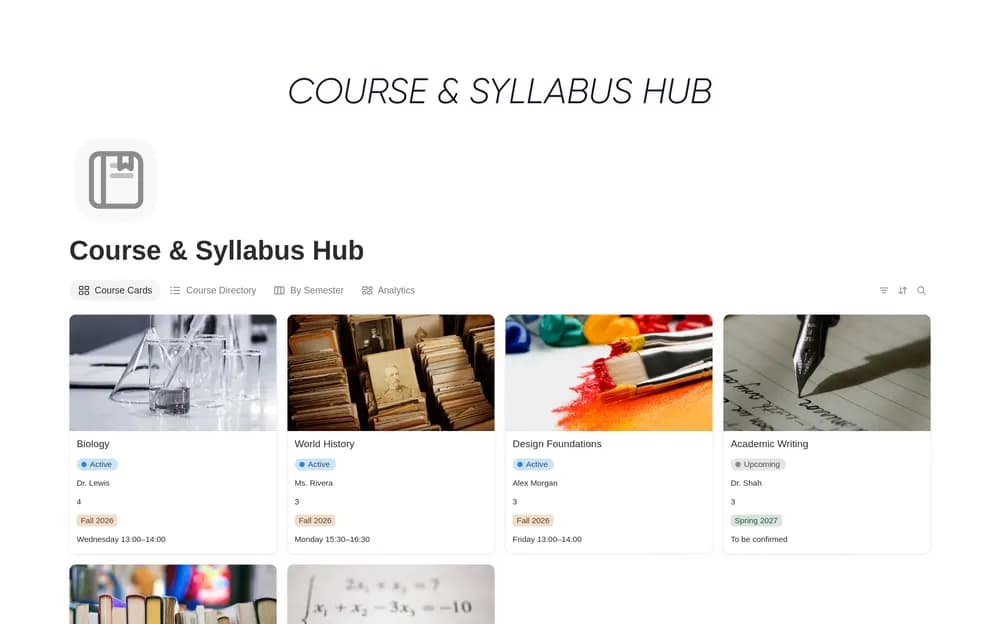
Turn each syllabus into a Notion course record with grading rules, key dates, instructor contacts, resources, and policies you can find all semester.
What’s included
- Course and syllabus database
- Grading weights and academic requirements
- Key dates and instructor details
- Links and resources for each course
- Current-course, key-date, and reference views
How to use it in practice
Pick one current course and copy its grading breakdown, instructor contact, and major dates from the syllabus. Add links to the course site and readings. Repeat for your other classes, then check the important-dates view at the start of each week to see exams and deadlines coming up.
Set it up in your workspace
- Open the original Notion Marketplace listing and add the template to your chosen workspace while signed in. Keep its example records until you understand how the pages connect.
- Pick one current course and copy its grading breakdown, instructor contact, and major dates from the syllabus.
- Try one complete example before adding a large backlog. Check that its views and any calculations show what you expect, then replace the sample content with your own.
Who it suits and what to consider
College, university, and high school students juggling several courses, plus parents helping them plan. Details are copied from your syllabi by hand and must be updated if an instructor changes dates. It organizes course information but does not appear to calculate grades or track individual assignments.