About University Hub
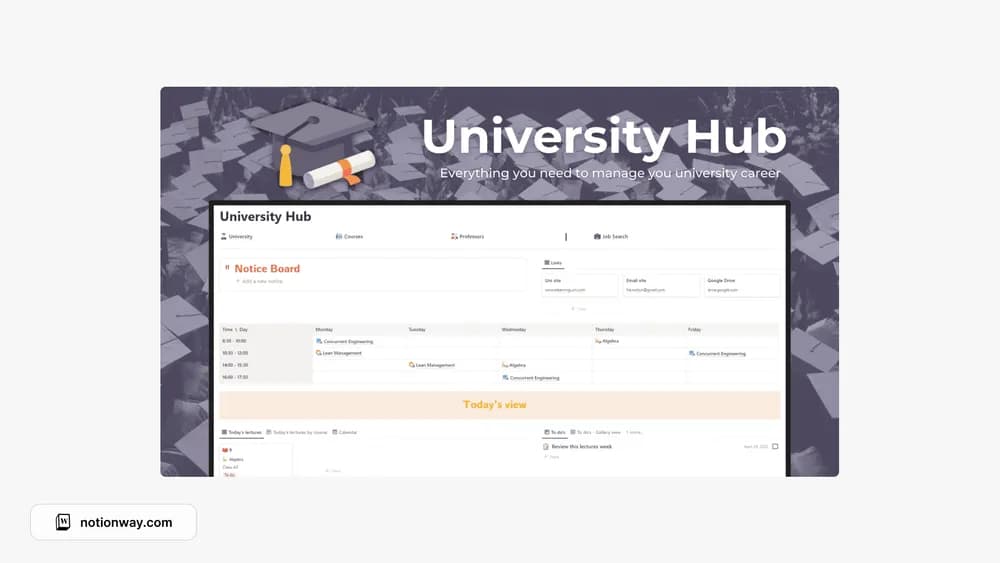
This is a student-oriented hub intended to bring university life together. It suits someone looking for a starting page rather than another isolated checklist. The download page is the place to check the exact layout and included sections before bringing over coursework.
What’s included
- Databases for courses, lessons, chapters or modules, exams, and tasks
- Professor records and a university overview
- A job-search page with a Canva résumé resource
How to use it in practice
Set up one current course from beginning to end. Add a lesson, its chapter or module, and the next assessed deadline, then check how the records appear from the course page. Enter professor details you genuinely need for communication. Once the structure makes sense, add the remaining courses and keep your weekly review focused on deadlines and unfinished study work.
Set it up in your workspace
- Follow the original creator’s checkout or access instructions to obtain the Notion page. Open that page while signed in, then duplicate it into the workspace you want to use.
- Add your current courses and the next important deadline. Navigate the template as if you were starting a busy Monday.
- Try one complete example before adding a large backlog. Check that its views and any calculations show what you expect, then replace the sample content with your own.
Who it suits and what to consider
University students who want a central academic workspace. A broad academic workspace for students who want course material and assessed work together. Use only the career section if it is relevant to your current semester; it does not need to become another weekly maintenance task.