About Habit Tracker with Analytics
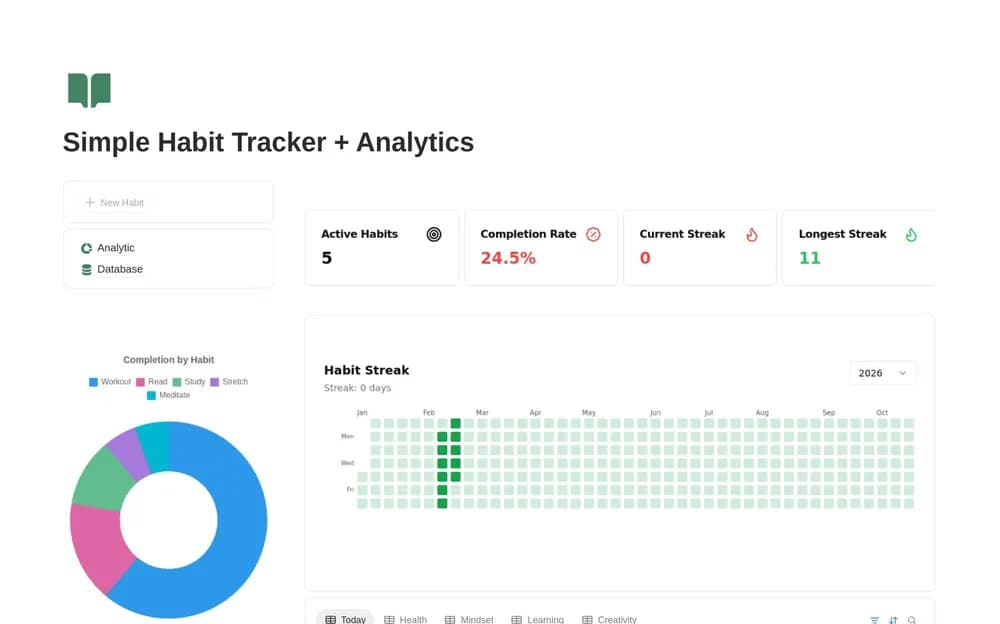
Measure habit consistency in Notion with completion rates, current and longest streaks, weekly and monthly progress, and category comparisons.
What’s included
- Single database for habits with targets and categories
- Daily completion tracking
- Completion rate and current and longest streaks
- Weekly and monthly progress
- Category performance
How to use it in practice
Add a few habits with a target and a category, such as exercise or reading. Log completions every day for a week. Check the completion rate and streak figures at the end of the week, and compare categories to see whether one area is consistently slipping.
Set it up in your workspace
- Open the original Notion Marketplace listing and add the template to your chosen workspace while signed in. Keep its example records until you understand how the pages connect.
- Add a few habits with a target and a category, such as exercise or reading.
- Try one complete example before adding a large backlog. Check that its views and any calculations show what you expect, then replace the sample content with your own.
Who it suits and what to consider
People who want numbers on how consistent they are, not just a row of checkboxes. Analytics depend on daily entries, so gaps in logging skew the numbers. The listing does not say whether any charts need a paid Notion plan.