About Kanpeki Habit Tracker Wheel
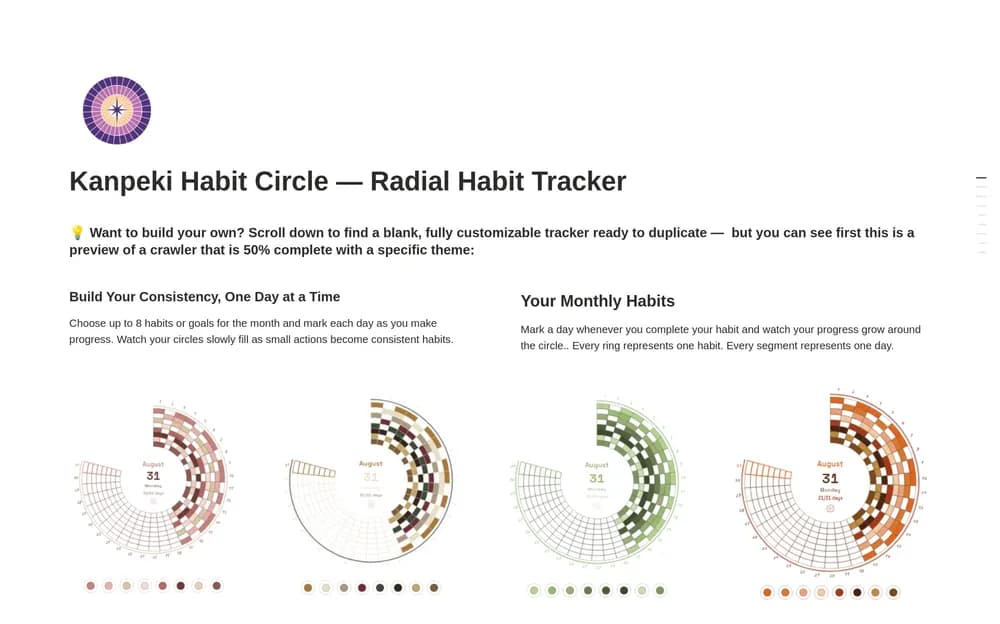
Track up to eight monthly habits on an interactive Notion wheel where each ring is a habit and each segment is a day you mark as done.
What’s included
- Interactive wheel widget with 8 concentric rings
- Ring segments for each day of the month
- Room for up to 8 habits or goals
- Blank starting version for your own setup
How to use it in practice
Choose three to five habits rather than all eight, so the first month stays realistic. Add the wheel to your personal dashboard where you will see it daily. Mark each completed habit at the same time each evening for a week. At the end of the week, look at the gaps in the rings and decide whether any habit needs a smaller target.
Set it up in your workspace
- Open the original Notion Marketplace listing and add the template to your chosen workspace while signed in. Keep its example records until you understand how the pages connect.
- Choose three to five habits rather than all eight, so the first month stays realistic.
- Try one complete example before adding a large backlog. Check that its views and any calculations show what you expect, then replace the sample content with your own.
Who it suits and what to consider
Visual thinkers who find checkbox habit lists dull and want to watch a month of consistency fill in. As an interactive widget, the wheel may be an external embed rather than a Notion database, so marks may not be filterable or exportable like normal properties. Each wheel covers eight habits and one month.