About Ideas Vault – Minimalist Idea Tracker
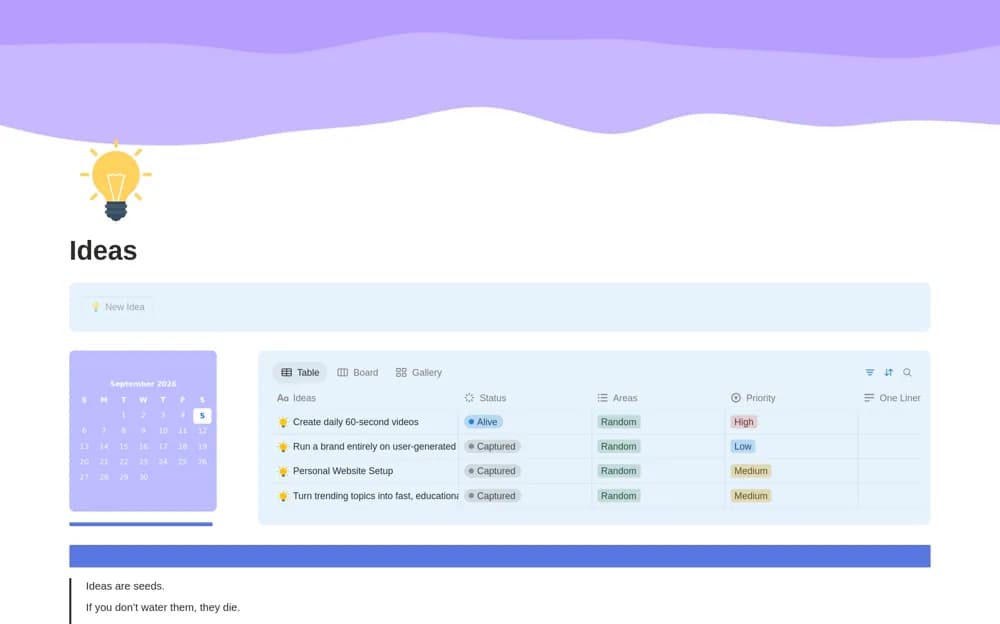
Capture ideas in Notion with one-line summaries, area tags, priorities, and table, board, or gallery views for reviewing what to pursue.
What’s included
- One-line idea summaries
- Area and priority tags
- Idea status pipeline
- Table, board, gallery, and nearby calendar views
How to use it in practice
Capture an idea in one sentence and tag the area it belongs to. During a weekly review, choose which ideas deserve a small experiment and leave the others as reference. Give an active idea a concrete next step before adding a date so the calendar reflects an intentional commitment.
Set it up in your workspace
- Open the original Notion Marketplace listing and add the template to your chosen workspace while signed in. Keep its example records until you understand how the pages connect.
- Capture an idea in one sentence and tag the area it belongs to.
- Try one complete example before adding a large backlog. Check that its views and any calculations show what you expect, then replace the sample content with your own.
Who it suits and what to consider
Writers and creators who want an idea inbox they can review without turning every thought into a project. An idea’s status or priority is your assessment. The template does not validate demand or automatically turn ideas into completed work.