About Intern Workspace
An internship workspace can help you remember projects, feedback, and what you learned while the details are fresh. This listing comes from Home From College. Keep records appropriate for your employer’s confidentiality rules and distinguish personal reflections from material you are allowed to share publicly.
What’s included
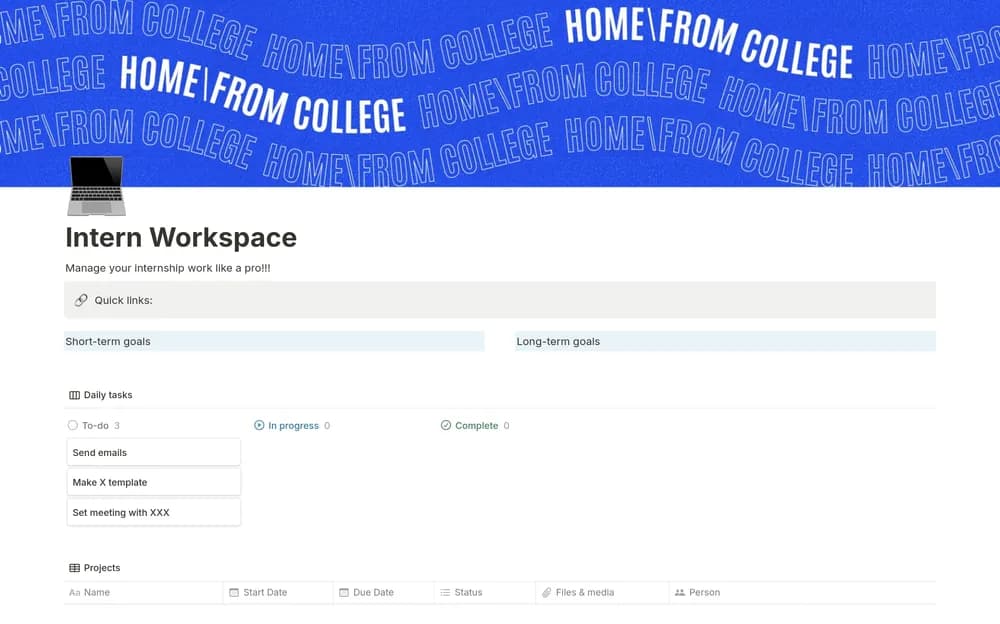
- Project-management sections for internship work
- Meeting notes
- Goal and personal-development organization
How to use it in practice
Add the current assignment and the next question you need to resolve with your supervisor. Keep meeting decisions and feedback close to the relevant project. At the end of the week, record progress and one skill to practice next. Review what work can be retained for your own learning under the employer’s policies.
Set it up in your workspace
- Open the original Notion Marketplace listing and add the template to your chosen workspace while signed in. Keep its example records until you understand how the pages connect.
- Record your current responsibilities and one useful piece of feedback. Keep a short weekly note about what you learned.
- Try one complete example before adding a large backlog. Check that its views and any calculations show what you expect, then replace the sample content with your own.
Who it suits and what to consider
Interns organizing their work and professional learning. Suited to organizing work during an internship. Keep company-confidential information in the approved workspace and use personal reflections appropriately.