About Loan and Borrowing Tracker
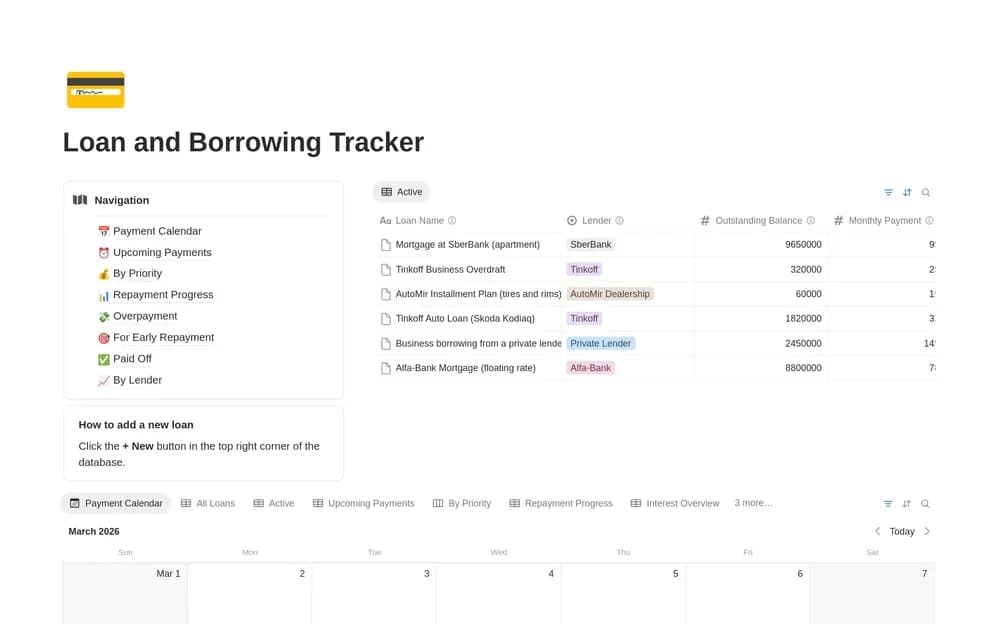
Record every loan, card balance, and installment plan in Notion, with interest, repayment progress, payment dates, and payoff priority views.
What’s included
- Loans database with type, purpose, lender, principal, rate, term, and collateral
- Repayment fields for monthly payment, balance, interest paid, and total cost
- Schedule fields including next payment and days until due
- Status and repayment-priority settings with early-repayment details
- Eight views such as payment calendar, upcoming payments, by priority, and paid off
How to use it in practice
Gather your current statements and enter one loan with its principal, rate, term, and next payment date. Compare the calculated balance and interest fields with the lender’s figures before adding the rest. Check the Upcoming Payments view each day for a week, and set a repayment priority for each debt once everything is entered.
Set it up in your workspace
- Open the original Notion Marketplace listing and add the template to your chosen workspace while signed in. Keep its example records until you understand how the pages connect.
- Gather your current statements and enter one loan with its principal, rate, term, and next payment date.
- Try one complete example before adding a large backlog. Check that its views and any calculations show what you expect, then replace the sample content with your own.
Who it suits and what to consider
Borrowers managing several debts who want deadlines and balances in one structured place. Balances and payment history come from what you enter; the listing does not describe any bank or lender connection. Calculated interest may differ from your lender’s method, so treat statements as the source of truth.