About Notion Budget Tracker
A budget is easier to understand when categories mean something in your own life. This tracker offers a starting structure for recording and reviewing money. It works best when you can update it consistently and distinguish a planned amount from what you actually spent.
What’s included
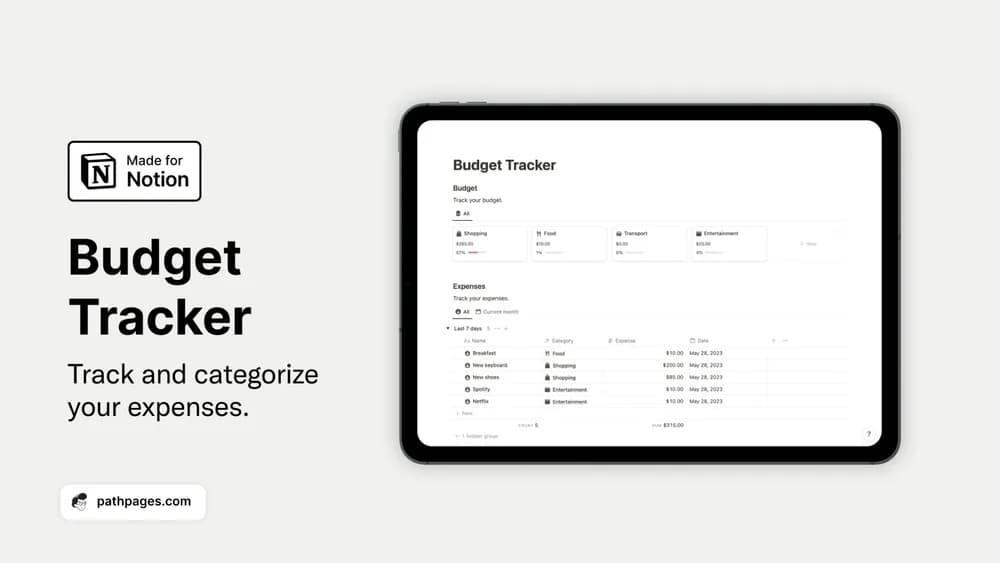
- Editable budget categories
- Expense entries for recording spending
- An automatic calculation of the budget remaining
How to use it in practice
Test the tracker with a closed month before planning the next one. Set realistic category amounts, enter the same expenses shown on your statements, and check the remaining balance against your own calculation. Decide how you will handle refunds and transfers so they do not distort spending. Once the sample month reconciles, make the logging routine short and repeatable.
Set it up in your workspace
- Get the template link from PathPages. Its free-template pages ask you to create an account for access. Open the delivered Notion page and duplicate it into your workspace.
- Use one month and a short set of spending categories. Compare your entries with your statements before relying on the totals.
- Try one complete example before adding a large backlog. Check that its views and any calculations show what you expect, then replace the sample content with your own.
Who it suits and what to consider
People who want a clearer record of everyday costs. A useful choice when you want category limits and a remaining-budget view. It relies on the records you add, so leave room in your routine to reconcile the totals with actual account activity.