About Notion Daily Journal
This journal gives everyday reflection a consistent place. You can use it for ordinary events as well as significant days. Keeping a few lines while the details are fresh is often more useful than waiting until you have time for a polished entry.
What’s included
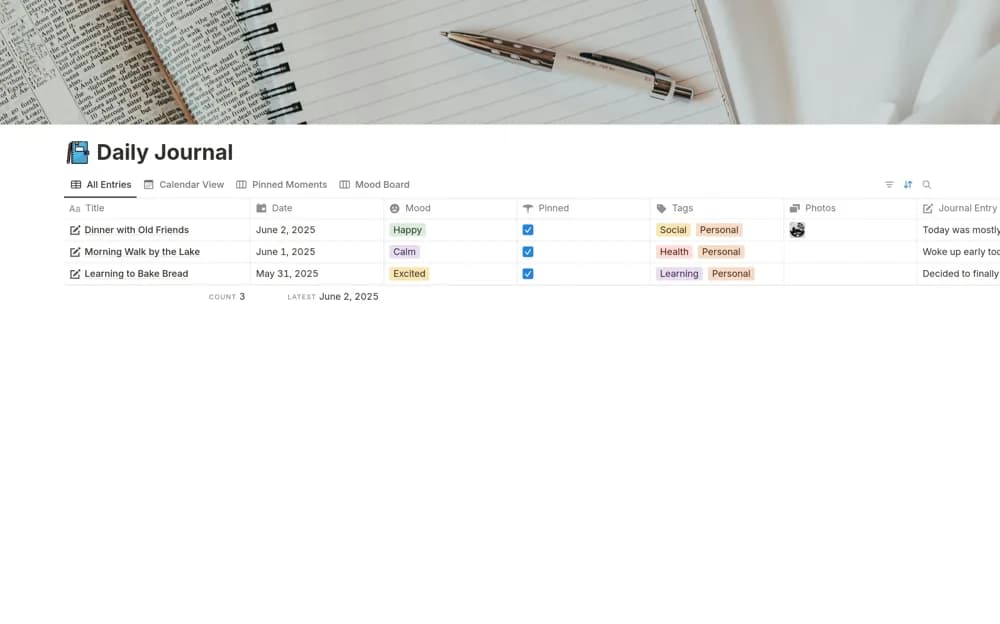
- Dated journal entries for reflections and memorable events
- Mood tags and star ratings for describing a day
- A record you can revisit to notice patterns over time
How to use it in practice
Use a repeatable prompt: what happened, how you felt, and what you want to carry into tomorrow. A few honest sentences are easier to sustain than a perfect daily essay. At the end of a week, read the entries alongside their mood tags and look for context, such as workload or sleep, rather than treating a rating as the whole story.
Set it up in your workspace
- Get the template link from PathPages. Its free-template pages ask you to create an account for access. Open the delivered Notion page and duplicate it into your workspace.
- Write a short entry about today and include one detail you might otherwise forget. Keep the first week deliberately brief.
- Try one complete example before adding a large backlog. Check that its views and any calculations show what you expect, then replace the sample content with your own.
Who it suits and what to consider
Anyone looking for a gentle journaling routine. A good choice for reflective writing with a little structure. Decide whether you prefer rating a whole day or simply recording a mood; either way, your writing supplies the meaning behind the tag.