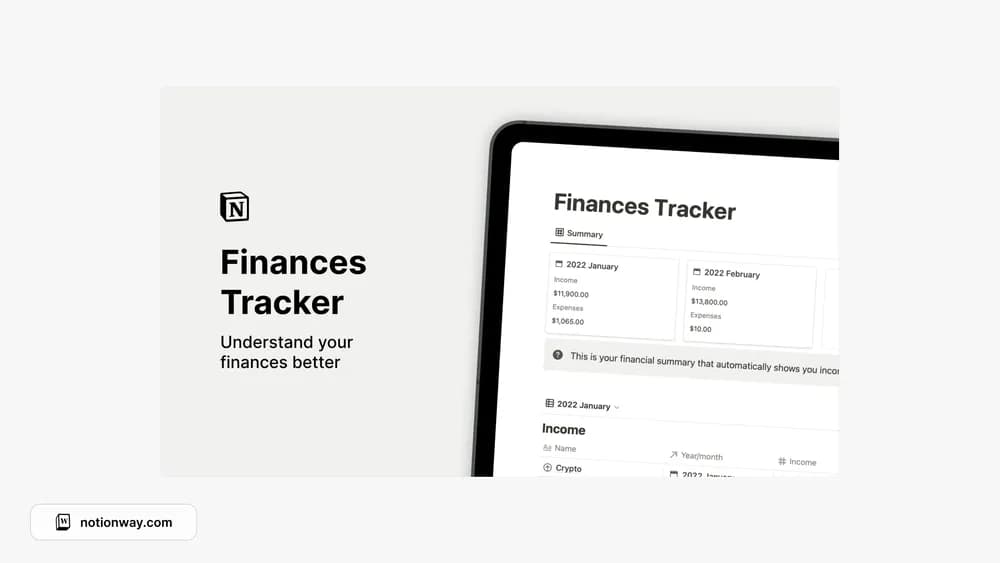
About Notion Finances Tracker
A finance tracker can make everyday spending easier to review when you maintain a consistent record. This template is part of the source collection’s personal-finance selection. Check the creator page for the exact calculations and included sections before importing financial records.
What’s included
- Records for income streams
- Expense tracking
- Automatic monthly financial summaries from the entered records
How to use it in practice
Use a complete recent month as a trial. Enter income and expenses with consistent categories, then compare the summary with your own records. Decide how to handle transfers so moving money between accounts does not look like new income or spending. Once the totals agree, review monthly changes alongside the individual entries that explain them.
Set it up in your workspace
- Follow the original creator’s checkout or access instructions to obtain the Notion page. Open that page while signed in, then duplicate it into the workspace you want to use.
- Try a single month and compare the records with your statements. Keep categories simple enough to use consistently.
- Try one complete example before adding a large backlog. Check that its views and any calculations show what you expect, then replace the sample content with your own.
Who it suits and what to consider
People organizing personal money records in Notion. A focused choice for manual financial records and a monthly overview. Regular reconciliation is part of the workflow, particularly when entries arrive from several accounts.