About Partnership Campaign Planner
A partner marketing tracker for campaign types, collaborators, dates, budgets, deliverables, and execution status.
What’s included
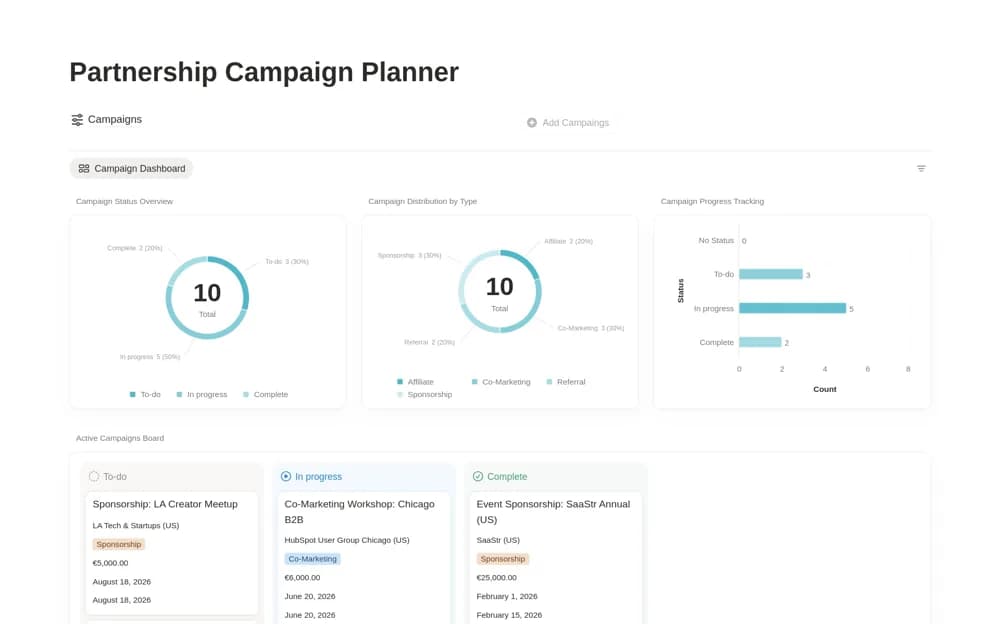
- Campaign database with partner and type
- Budget, start/end dates, and deliverables
- Campaign dashboard and status-based active board
How to use it in practice
Create one campaign with the agreed partner and measurable objective. Break the deliverables into responsibilities and confirm dates with both teams. Review the active board regularly, keeping budget estimates and actual commitments clear before making additional promises.
Set it up in your workspace
- Open the original Notion Marketplace listing and add the template to your chosen workspace while signed in. Keep its example records until you understand how the pages connect.
- Create one campaign with the agreed partner and measurable objective.
- Try one complete example before adding a large backlog. Check that its views and any calculations show what you expect, then replace the sample content with your own.
Who it suits and what to consider
Partnership managers and marketers coordinating collaborative campaigns. The source organizes campaign work, without confirming partner communication or performance-data imports.