About Personal Journal: Daily Reflection & Life Clarity
Write daily journal entries in Notion, link them to recurring themes, use a prompt library, move action items to Open Loops, and run monthly reviews.
What’s included
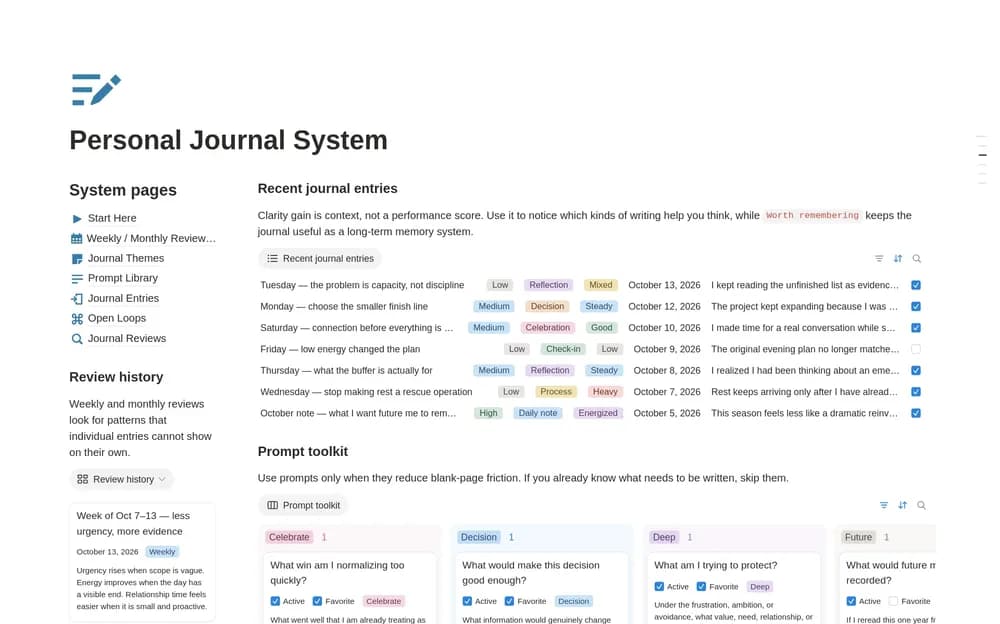
- Daily journal entries database
- Journal prompt library
- Recurring themes linked to entries
- Open Loops for decisions and follow-ups
- Weekly and monthly reviews with a Worth Remembering collection
How to use it in practice
Write a short entry each day for a week, using a prompt when you are stuck. Tag entries with one or two themes as you go. Move anything that needs a decision or conversation into Open Loops, then complete a weekly review to see which themes repeated.
Set it up in your workspace
- Open the original Notion Marketplace listing and add the template to your chosen workspace while signed in. Keep its example records until you understand how the pages connect.
- Write a short entry each day for a week, using a prompt when you are stuck.
- Try one complete example before adding a large backlog. Check that its views and any calculations show what you expect, then replace the sample content with your own.
Who it suits and what to consider
Journalers who want their entries to reveal patterns and lead to decisions, not just record days. Pattern-finding depends on how consistently you tag themes; the template organizes reflection but does not analyze it for you. With many sections, it may feel heavy if you only want a simple diary.