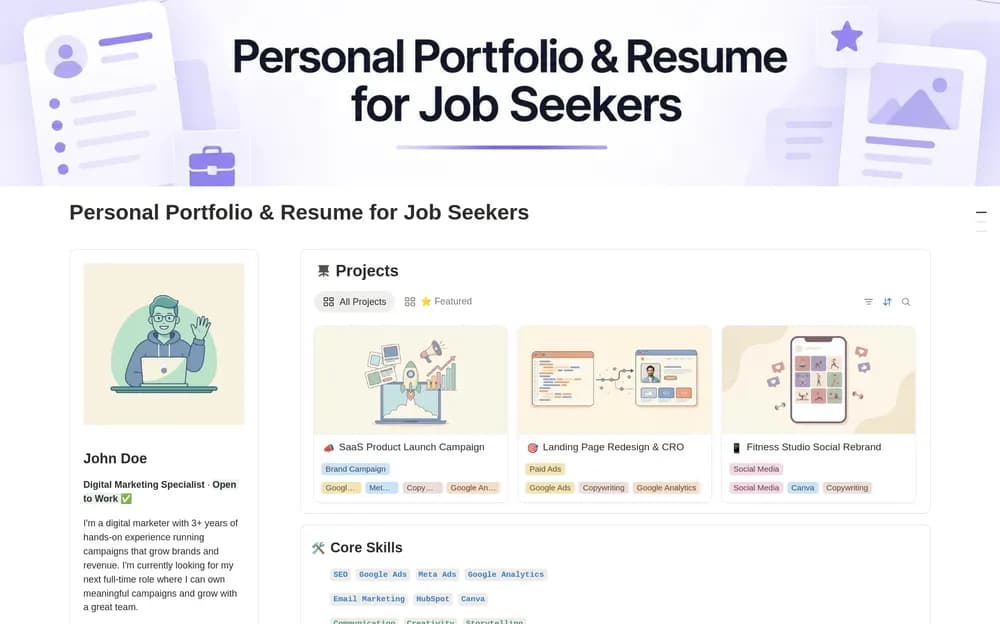
About Personal Portfolio & Resume for Job Seekers
Publish a job seeker’s portfolio site from Notion with a profile sidebar, guided project case studies, work history, and a full resume page.
What’s included
- Profile sidebar as a synced block with an Open to Work badge
- Projects database with a guided case-study template
- Work experience timeline with fill-in prompts
- Skills chips plus About Me and resume pages
- Quick links and a call-to-action footer
How to use it in practice
Follow the setup guide and replace the sample profile with your own headline and photo. Write one project case study using the goal, process, and results prompts, and add your two most recent roles. Publish the page, open it on a phone, and ask a friend to find your resume and contact link within a minute.
Set it up in your workspace
- Open the original Notion Marketplace listing and add the template to your chosen workspace while signed in. Keep its example records until you understand how the pages connect.
- Follow the setup guide and replace the sample profile with your own headline and photo.
- Try one complete example before adding a large backlog. Check that its views and any calculations show what you expect, then replace the sample content with your own.
Who it suits and what to consider
Job seekers, career switchers, and recent graduates who want one shareable link for applications. Publishing makes the page public, so review every field before sharing and replace all of the sample projects and roles.