About School To-Do List & Planner
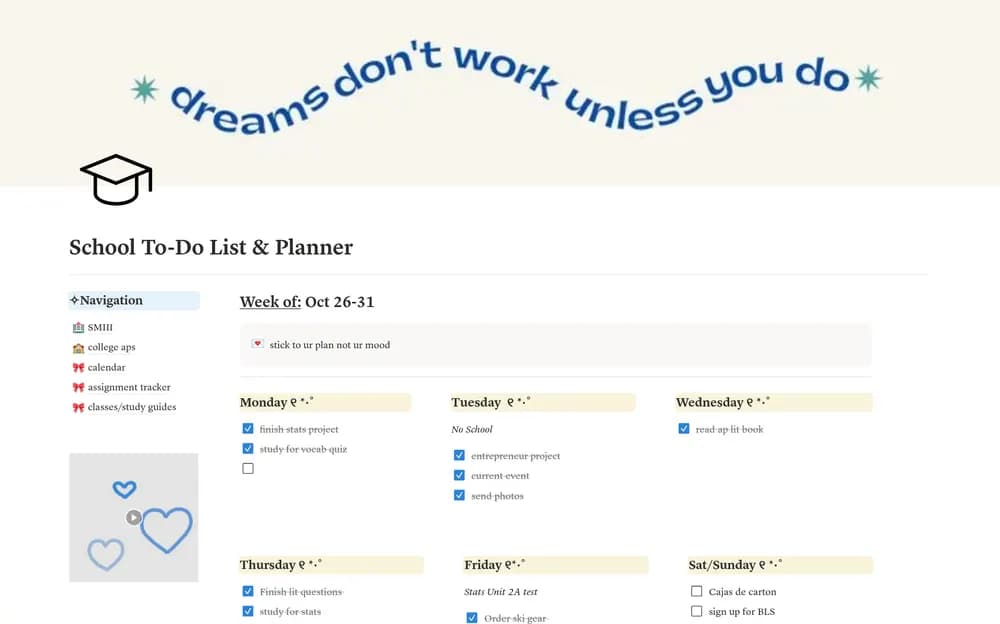
Keep school assignments on track in Notion with a to-do list for each weekday, an assignment tracker, class pages, a calendar, and weekly goals.
What’s included
- A to-do list for every weekday
- Navigation bar linking to a calendar
- Assignment tracker
- Separate pages for each class
- Weekly goals section
How to use it in practice
Create a page for each class you are taking this term. Enter the assignments due in the next two weeks into the tracker, then spread the work across the daily to-do lists. Set one or two weekly goals on Sunday and check the calendar midweek to catch upcoming deadlines.
Set it up in your workspace
- Open the original Notion Marketplace listing and add the template to your chosen workspace while signed in. Keep its example records until you understand how the pages connect.
- Create a page for each class you are taking this term.
- Try one complete example before adding a large backlog. Check that its views and any calculations show what you expect, then replace the sample content with your own.
Who it suits and what to consider
High school and college students who want a simple weekly view of homework and classes. The listing is short and does not describe grade tracking or reminders, so due dates rely on you checking the planner. Class pages start empty and need your own course details.