About Study & Learning OS
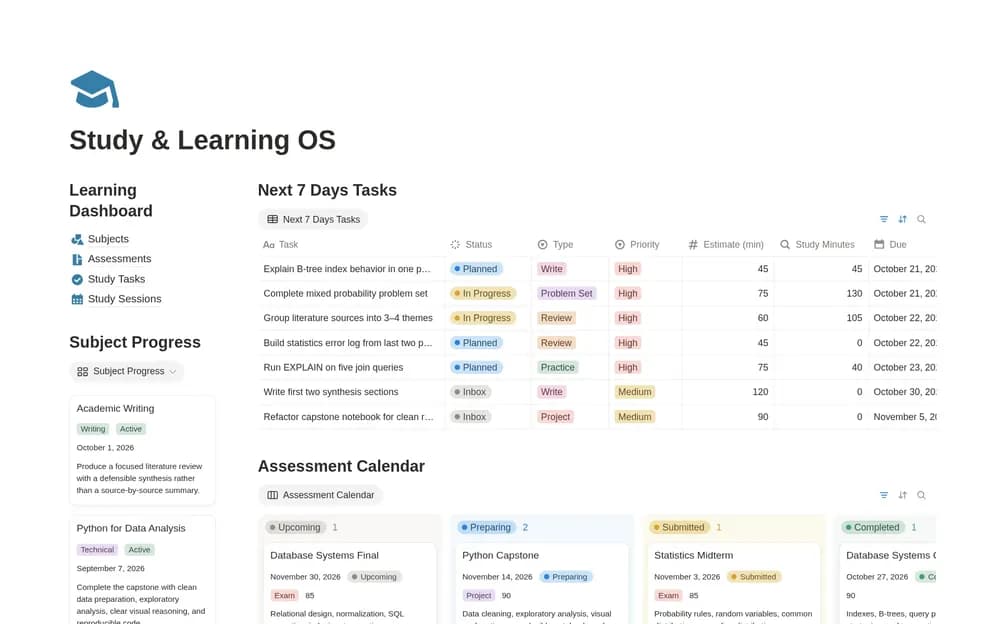
Connect subjects, assessments, study tasks, and logged study sessions in one Notion workspace for school, university, or self-directed learning.
What’s included
- Subjects database
- Assessment tracker for exams, quizzes, and tests
- Study task list for assignments and revision
- Study session log
How to use it in practice
Add the subjects you are studying now, then enter each exam or quiz with its date. Break the nearest assessment into a few revision tasks connected to its subject. Log every study session you complete this week and review which subjects received time and which were neglected.
Set it up in your workspace
- Open the original Notion Marketplace listing and add the template to your chosen workspace while signed in. Keep its example records until you understand how the pages connect.
- Add the subjects you are studying now, then enter each exam or quiz with its date.
- Try one complete example before adding a large backlog. Check that its views and any calculations show what you expect, then replace the sample content with your own.
Who it suits and what to consider
Students and independent learners balancing several subjects and upcoming exams. Session records depend on you logging them; the listing does not mention a built-in timer or calendar sync.