About Basic Sales CRM
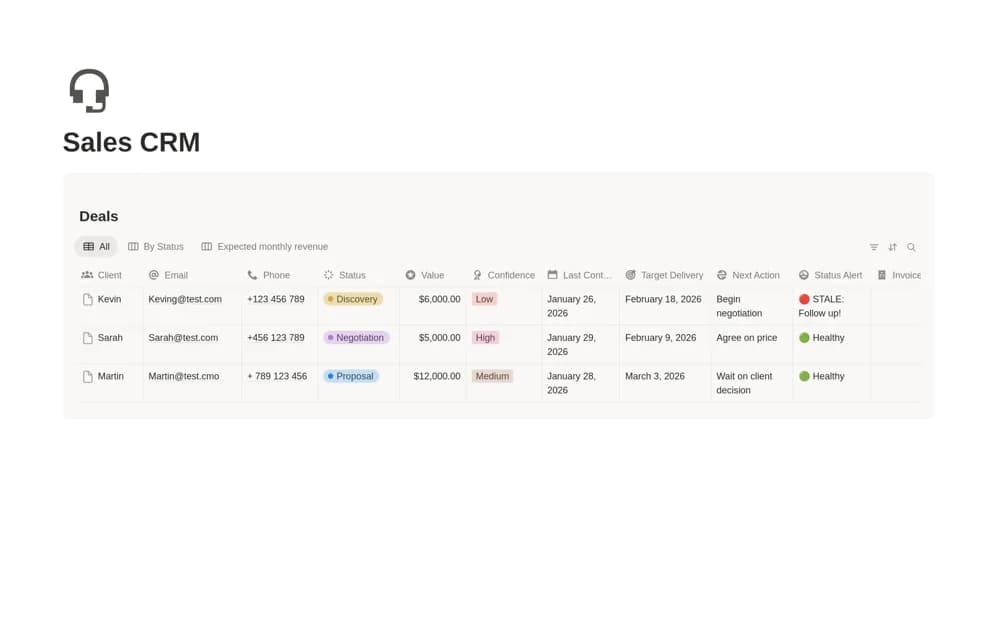
A visual sales pipeline with confidence-weighted expected revenue, stale-deal warnings, close-date grouping, and a place to attach contracts or invoice documents.
What’s included
- Discovery-to-Done pipeline
- Confidence-based expected-revenue calculation
- Seven-day stale warnings, close-date view, and document attachments
How to use it in practice
Add a deal with its actual value, expected close date, and a defensible confidence level. Check the forecast calculation with a manual example, then review stale warnings for deals needing contact. Keep forecast revenue separate from collected money and revise confidence when the buyer’s situation changes.
Set it up in your workspace
- Open the original Notion Marketplace listing and add the template to your chosen workspace while signed in. Keep its example records until you understand how the pages connect.
- Add a deal with its actual value, expected close date, and a defensible confidence level.
- Try one complete example before adding a large backlog. Check that its views and any calculations show what you expect, then replace the sample content with your own.
Who it suits and what to consider
Sales representatives and small teams comparing active opportunities with a simple forecast. The supplied confidence percentages are assumptions, not measured probabilities for your business. A weighted forecast does not represent a partial payment or guarantee future cash receipts.