About Smiski-Themed Student Dashboard
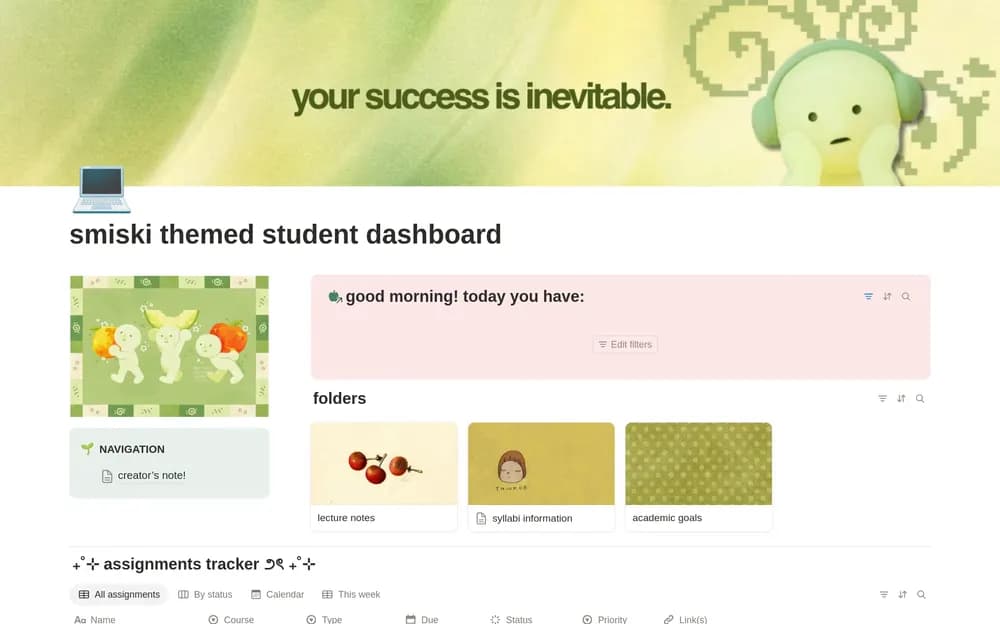
Plan a semester from a cozy Smiski-themed Notion dashboard with a class schedule, course folders, quick links, a monthly agenda, and assignments.
What’s included
- Class schedule with meeting days, times, and locations plus a today-you-have section
- Assignment tracker by course, due date, priority, and status
- All, this week, calendar, and status views
- Course folders for notes, syllabus, study guides, and professor details
- Monthly agenda and quick links to sites such as Canvas and Gmail
How to use it in practice
Enter each class with its meeting days, time, and location, then confirm the today section shows the right classes. Add every assignment due this week and next. Create a folder for one course and move its syllabus and notes in, then use the monthly agenda for club meetings or appointments and review the week on Sunday.
Set it up in your workspace
- Open the original Notion Marketplace listing and add the template to your chosen workspace while signed in. Keep its example records until you understand how the pages connect.
- Enter each class with its meeting days, time, and location, then confirm the today section shows the right classes.
- Try one complete example before adding a large backlog. Check that its views and any calculations show what you expect, then replace the sample content with your own.
Who it suits and what to consider
Students who want a personal, cute-styled homepage for classes and coursework. Quick links only open outside sites; the listing does not describe pulling assignments or grades from Canvas or a student portal. Gallery covers and colors can be replaced if you prefer a different look.