About Student Life Planner
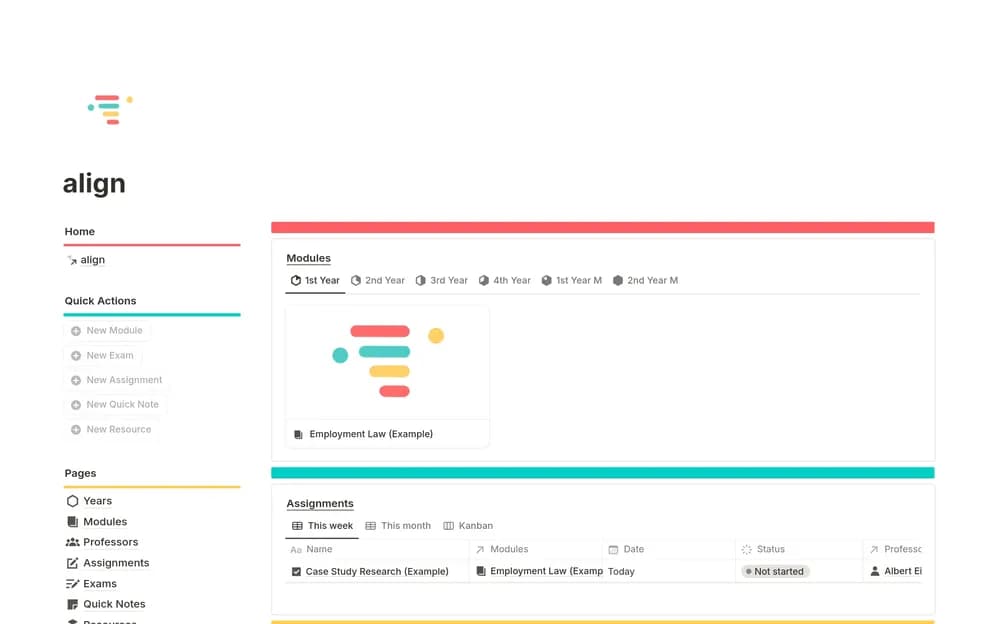
align’s University Student OS is a paid academic template described around course organization, assignment tracking, and exam planning. It is worth comparing if a single timetable leaves too much coursework scattered elsewhere. Look through the preview with your actual semester in mind: a course with weekly reading creates a different workload from one with a final project. Check how you will connect notes to the relevant course and see what needs attention next. Start with a manageable portion of the term so that maintaining the planner does not become another assignment.
What’s included
- Modules, lecture or reading notes, and learning-confidence records
- Assignment and exam trackers with course links and countdowns
- A calendar, professor directory, resource hub, and home dashboard
How to use it in practice
Add one current module, its next assessment, and a set of lecture notes. Check whether the countdown and calendar show the right date, then use the confidence field to identify a topic that needs review. Keep the original assignment brief linked from the record. Review the dashboard weekly against your course portal before adding the remaining semester.
Set it up in your workspace
- Open the original Notion Marketplace listing and add the template to your chosen workspace while signed in. Keep its example records until you understand how the pages connect.
- Add one course, its next assignment, and an upcoming exam. Check whether the next study session is easy to plan from those records.
- Try one complete example before adding a large backlog. Check that its views and any calculations show what you expect, then replace the sample content with your own.
Who it suits and what to consider
University students planning work across several courses. A broad academic planner for students who want assessments and learning material connected. Match any example categories to your own institution and keep official course information as the authority for deadlines.