About SukiCal Fan Activity Schedule & Diary
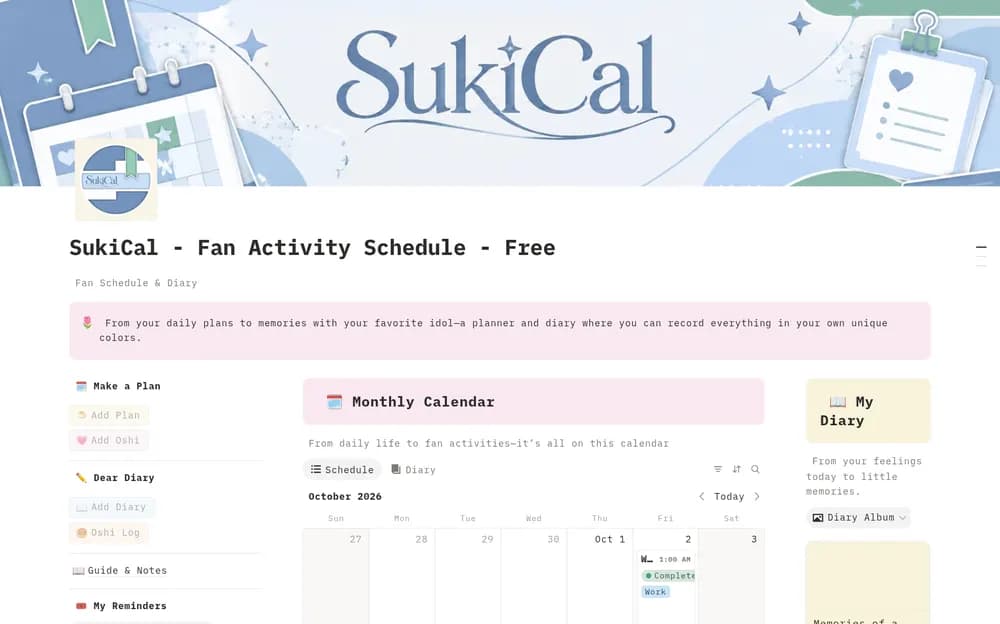
Track fan events, bookings, deadlines, and everyday plans on one Notion calendar, then save concert memories in a linked diary with moods and photos.
What’s included
- Monthly calendar with everyday plans and fan activities kept separate
- Bookings and deadlines, including plans without a set date
- Categories and tags for schedules
- Diary with moods, tags, and photos linked to plans
- Dashboard with Schedule and Diary databases
How to use it in practice
Add the upcoming events you already know about, such as ticket sales, concerts, or releases, and note booking deadlines. Enter one undated plan you are hoping for so it does not get lost. After any event or ordinary day worth remembering, write a short diary entry with a mood and photo and link it to the plan. At the end of the week, check the calendar to see whether everyday and fan plans stay clearly separated.
Set it up in your workspace
- Open the original Notion Marketplace listing and add the template to your chosen workspace while signed in. Keep its example records until you understand how the pages connect.
- Add the upcoming events you already know about, such as ticket sales, concerts, or releases, and note booking deadlines.
- Try one complete example before adding a large backlog. Check that its views and any calculations show what you expect, then replace the sample content with your own.
Who it suits and what to consider
Fans who follow artists, characters, or series and want event plans and personal memories in one place. Artist profiles, anniversary tracking, and expense summaries are reserved for the paid Pro version. The listing does not mention importing event dates, so plans are entered by hand.