About Weekly Reset
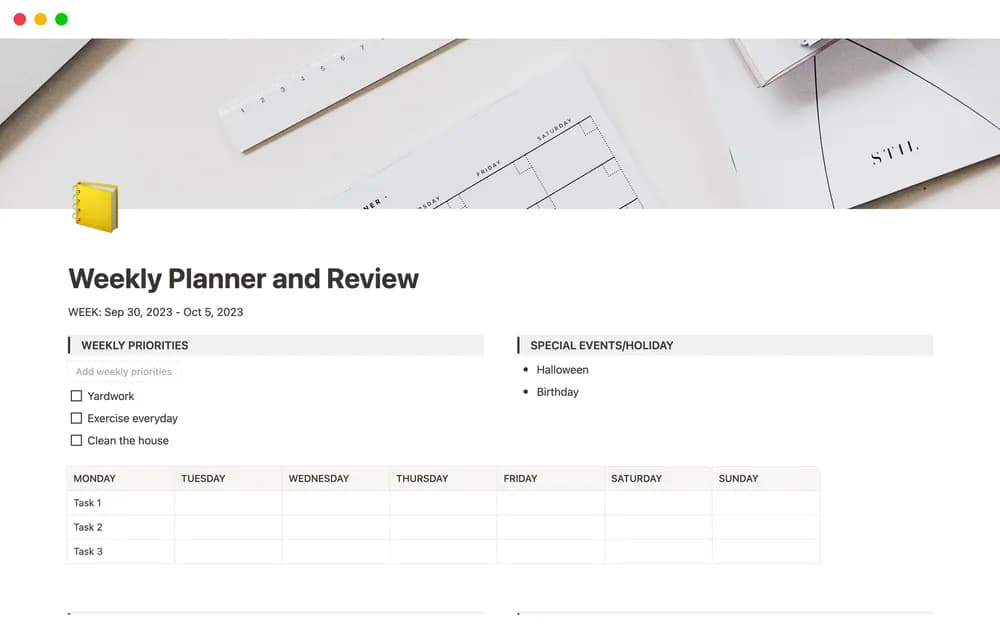
Ten Years’ free Weekly Planner and Review centers on a useful transition: closing the previous week and making a realistic plan for the next. Consider it if unfinished tasks keep moving forward without a fresh decision. Use the review to check commitments, notice what is waiting on someone else, and choose what still deserves time. Then compare the plan with your actual calendar. The routine should leave enough space for ordinary interruptions. A short review that you return to regularly will tell you more than a detailed retrospective you stop maintaining.
What’s included
- A weekly planning and review structure
- Space for tasks, appointments, and priorities
- A framework for breaking broader projects into manageable steps
How to use it in practice
Review the week you just completed before planning the next one. Decide which unfinished commitments still matter, then check the calendar for fixed appointments. Choose a small set of priorities and define the next action for each. Leave some capacity for changes so the plan can survive an ordinary week rather than only an ideal one.
Set it up in your workspace
- Open the original Notion Marketplace listing and add the template to your chosen workspace while signed in. Keep its example records until you understand how the pages connect.
- Review the past week in a few sentences. Choose a short list of outcomes, then check that the coming week has time for them.
- Try one complete example before adding a large backlog. Check that its views and any calculations show what you expect, then replace the sample content with your own.
Who it suits and what to consider
People who want a short, repeatable planning routine. Useful for a recurring review without adopting a large operating system. Keep the planning session focused on decisions and use your existing task record for details where that works well.