About Visited Countries Tracker
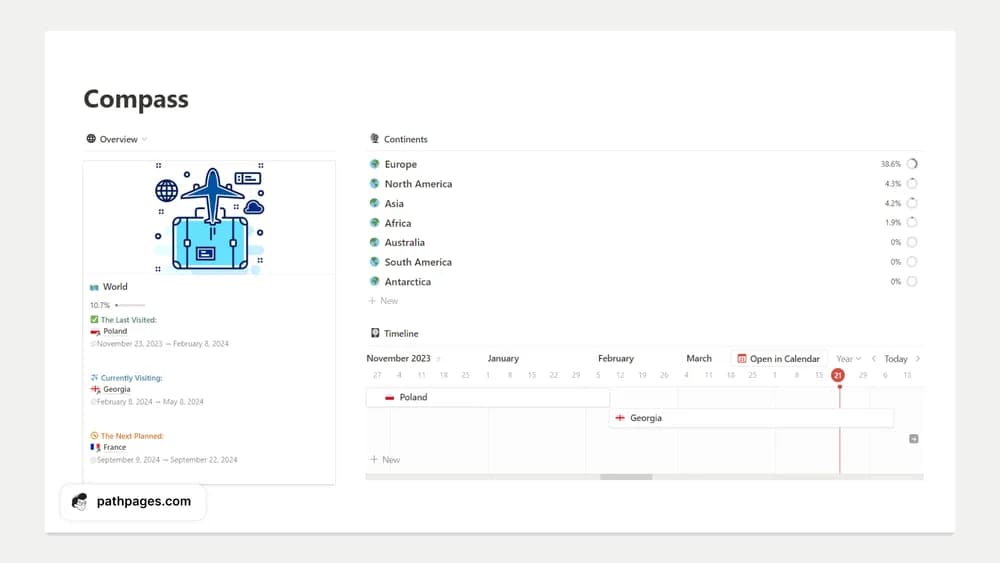
A visited-countries tracker is a collection rather than an itinerary. It gives travel memories and future interests a place to live. Add the details you enjoy revisiting, such as a date or a brief memory, and keep the record personal rather than turning it into a completion target.
What’s included
- Records for visited and desired countries
- Global and continental progress views
- Calendar, timeline, and list options with country-travel pages described by the creator
How to use it in practice
Record the countries you have visited using one consistent rule, such as a genuine visit rather than an airport connection. Add a few destinations you want to explore and retain useful notes about past trips. Review country information against current official guidance when planning. The progress view is a personal record, so use the definition that makes sense to you.
Set it up in your workspace
- Follow the original creator’s checkout or access instructions to obtain the Notion page. Open that page while signed in, then duplicate it into the workspace you want to use.
- Add a few past trips with one detail you want to remember. Keep future destinations distinct from places already visited.
- Try one complete example before adding a large backlog. Check that its views and any calculations show what you expect, then replace the sample content with your own.
Who it suits and what to consider
Travelers who enjoy looking back on past trips. A good fit for a long-term travel record. Country pages can provide planning context, while time-sensitive travel information should be checked again before a trip.