About Advanced To-Do List
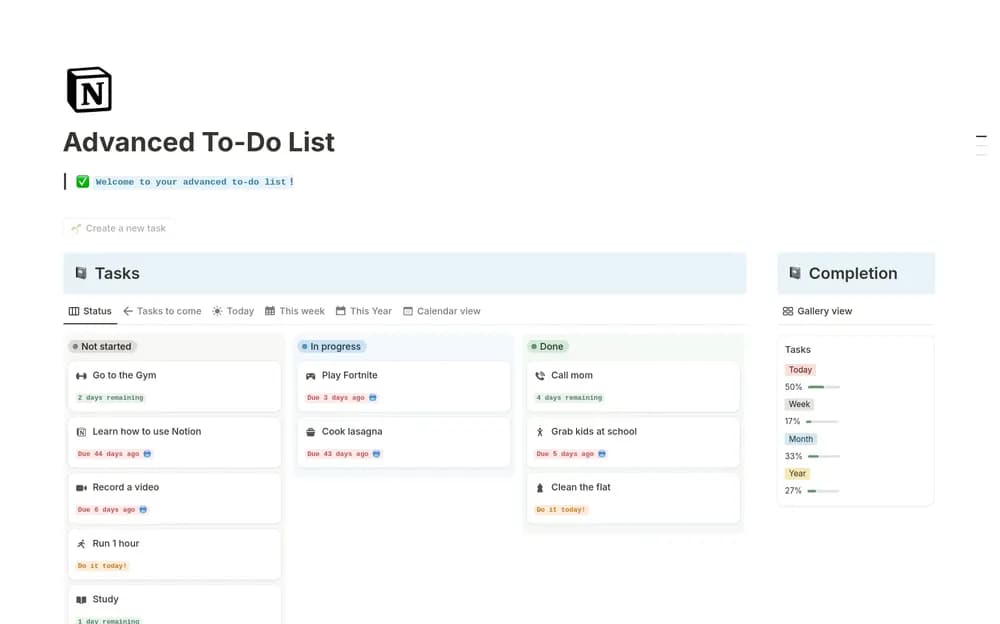
Manage tasks in Notion through Today, This Week, This Year, and Upcoming views, plus a second database that tracks completion rates over time.
What’s included
- Today, This Week, This Year, and Upcoming views
- Calendar view for deadlines
- Status view for task completion
- Second database reporting completion rates by day, week, month, and year
How to use it in practice
Add the tasks due this week and a few longer-term goals for the year. Work from the Today view and update statuses as you finish items. After a week, open the completion database to see your daily and weekly rates, and decide whether your daily list is realistic.
Set it up in your workspace
- Open the original Notion Marketplace listing and add the template to your chosen workspace while signed in. Keep its example records until you understand how the pages connect.
- Add the tasks due this week and a few longer-term goals for the year.
- Try one complete example before adding a large backlog. Check that its views and any calculations show what you expect, then replace the sample content with your own.
Who it suits and what to consider
Students and professionals who like seeing statistics on how many tasks they finish. Completion rates measure checked tasks, not the importance of the work. The listing does not explain whether the completion database fills in automatically, so check how it updates in your copy.