About Daily & Weekly To-Do Lists
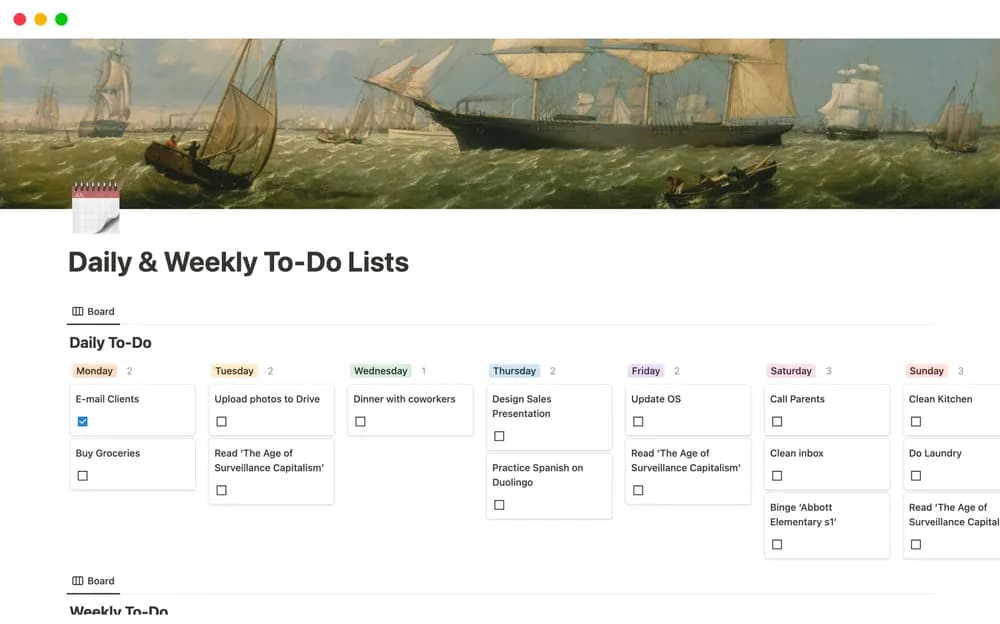
Organize tasks on two Notion boards on one page: a Daily To-Do board for the seven weekdays and a Weekly To-Do board for each week of the month.
What’s included
- Daily To-Do board by day of the week
- Weekly To-Do board by week of the month
- Both boards on a single page
How to use it in practice
Put the tasks for the next few days on the daily board under the correct day. Add larger tasks for the rest of the month on the weekly board. Each Sunday, move items from the coming week onto specific days and clear what you finished.
Set it up in your workspace
- Open the original Notion Marketplace listing and add the template to your chosen workspace while signed in. Keep its example records until you understand how the pages connect.
- Put the tasks for the next few days on the daily board under the correct day.
- Try one complete example before adding a large backlog. Check that its views and any calculations show what you expect, then replace the sample content with your own.
Who it suits and what to consider
Students and individuals who want near-term and week-level tasks visible together. The listing does not mention dates, priorities, or calendar views, so it is a simple manual board. Tasks are moved between boards by hand.