About Aesthetic Weekly Schedule
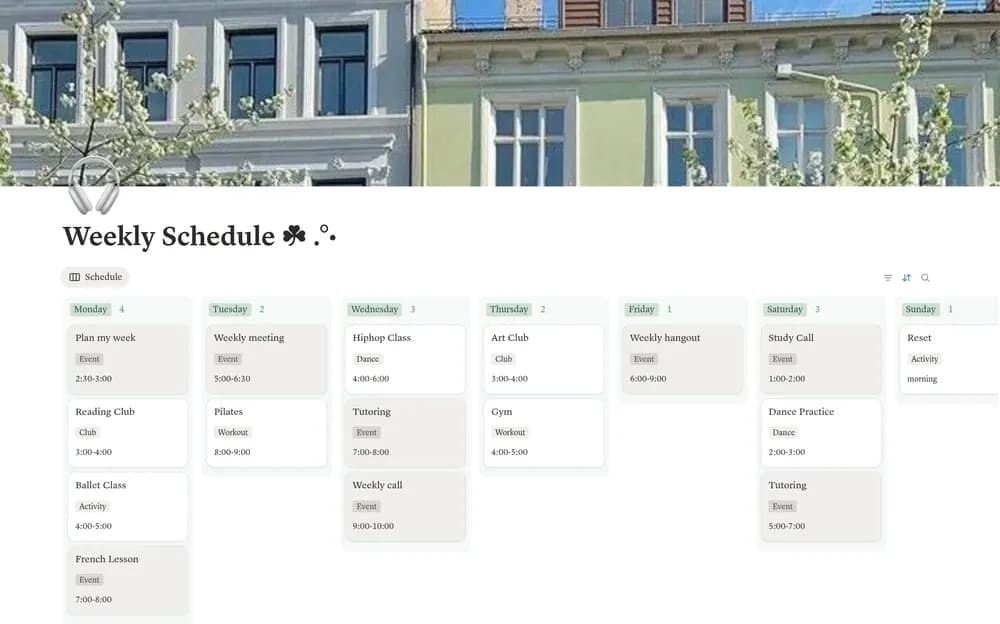
Lay out weekly events in Notion in chronological order by day and time, with type labels and a grey highlight for higher-priority commitments.
What’s included
- Events ordered chronologically by date and time
- Grey marking for higher-priority events
- Event type labels you can rename
- Adaptable for classes, after-school activities, or trips
How to use it in practice
Enter this week’s fixed commitments with the day and time so they sort in order. Rename the type options to fit how you use it, such as class, work, or appointment. Mark the commitments you cannot move as high priority, and review the list each evening to prepare for the next day.
Set it up in your workspace
- Open the original Notion Marketplace listing and add the template to your chosen workspace while signed in. Keep its example records until you understand how the pages connect.
- Enter this week’s fixed commitments with the day and time so they sort in order.
- Try one complete example before adding a large backlog. Check that its views and any calculations show what you expect, then replace the sample content with your own.
Who it suits and what to consider
Students and busy households who want a clean list of the week’s classes, activities, and appointments. It is a schedule list, not a task manager, so to-dos and progress are not tracked. Events are entered by hand and do not sync with an outside calendar.