About Aesthetic Widgets Gallery: Fully Customizable
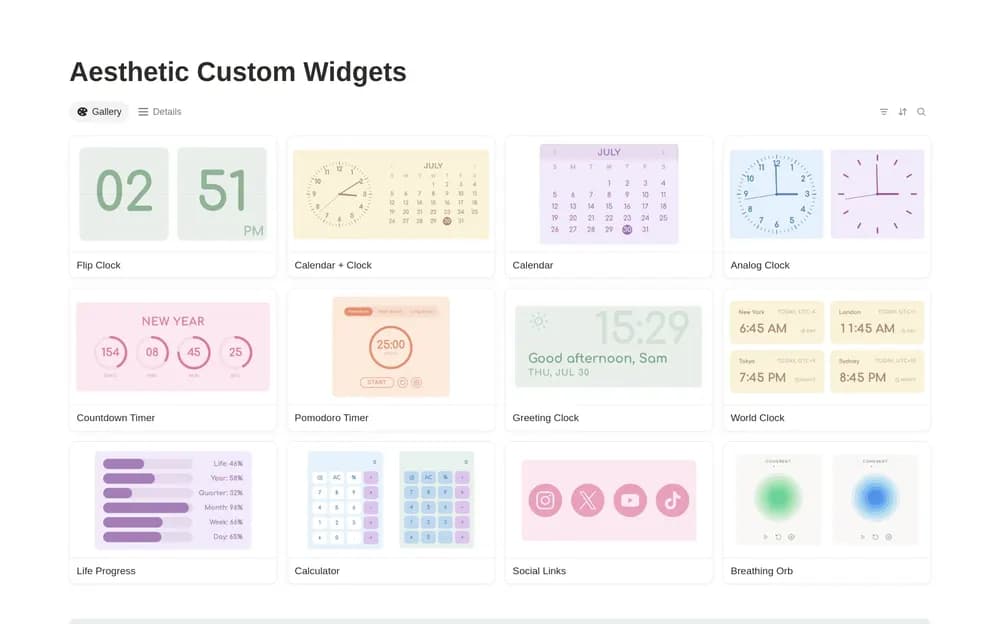
Browse a Notion gallery of customizable embed widgets, from flip clocks and calendars to Pomodoro timers, life-progress bars, and a breathing orb.
What’s included
- Gallery and table views of widgets with previews, categories, and links
- Clocks, calendars, countdown and Pomodoro timers, and a calculator
- Social link icons, life-progress bars, and a breathing orb with four patterns
- Widget pages with live previews and a linked customizer
- Reusable page template for adding resources
How to use it in practice
Choose one dashboard page you use every day and pick two widgets that would genuinely help, such as a Pomodoro timer and a calendar. Customize them on the linked customizer, copy the embed links, and add them to the page. Use them for a week, then check how they look on mobile and in dark mode before adding more.
Set it up in your workspace
- Open the original Notion Marketplace listing and add the template to your chosen workspace while signed in. Keep its example records until you understand how the pages connect.
- Choose one dashboard page you use every day and pick two widgets that would genuinely help, such as a Pomodoro timer and a calendar.
- Try one complete example before adding a large backlog. Check that its views and any calculations show what you expect, then replace the sample content with your own.
Who it suits and what to consider
Notion users decorating dashboards who want ready-made embeds without hunting for widget sites. Widgets are embedded from an external customizer, so they depend on that service staying available and may load more slowly than native Notion blocks.