About Sales Tracker & Revenue Analytics
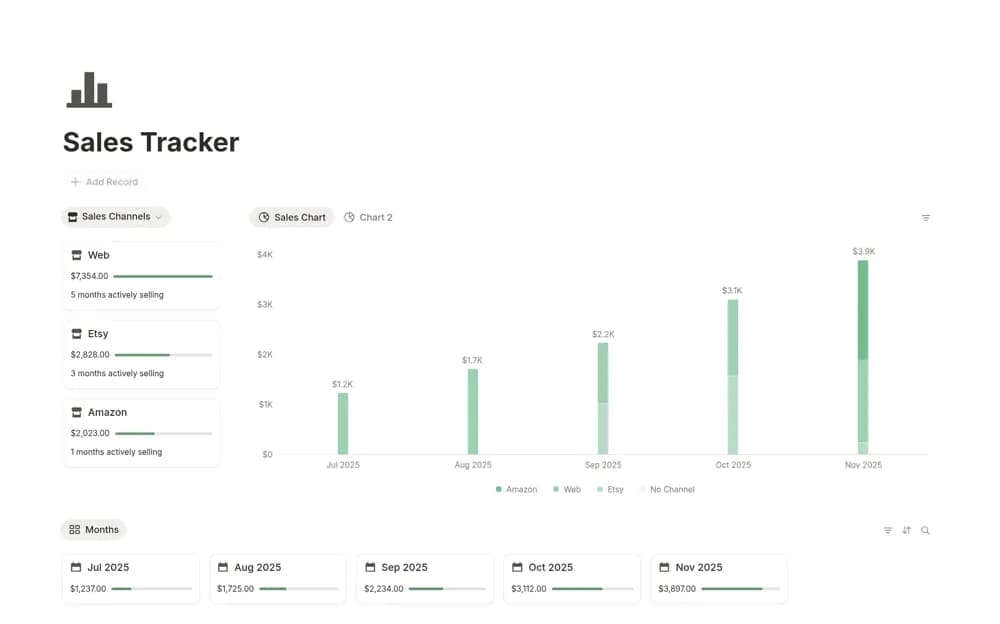
A sales database with channel records, monthly relationships, and charts for reviewing revenue patterns.
What’s included
- A central sales database
- Store or channel attribution
- Monthly relationships and visual reporting by period and channel
How to use it in practice
Record a few actual sales with consistent dates and channel names. Check the monthly grouping and compare a total with the source sales records. Use the chart to choose a question worth investigating rather than assuming a change in revenue explains its cause.
Set it up in your workspace
- Open the original Notion Marketplace listing and add the template to your chosen workspace while signed in. Keep its example records until you understand how the pages connect.
- Record a few actual sales with consistent dates and channel names.
- Try one complete example before adding a large backlog. Check that its views and any calculations show what you expect, then replace the sample content with your own.
Who it suits and what to consider
Small sellers comparing recorded sales across stores or channels. The source establishes sales tracking and charts, without confirming automatic imports from storefronts.