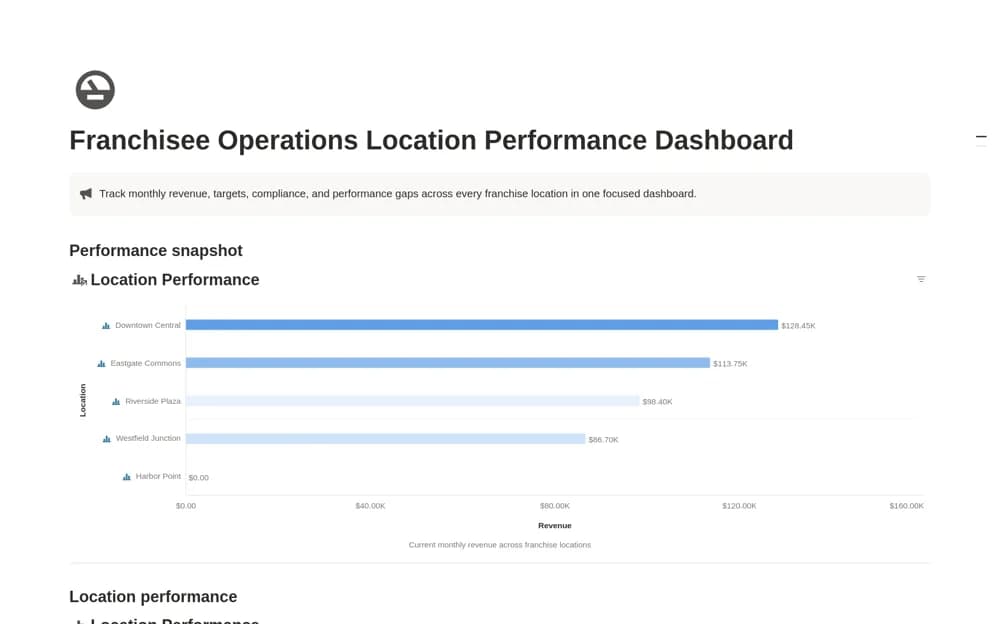
About Franchisee Operations Location Dashboard
A monthly franchise reporting dashboard comparing location revenue, targets, compliance scores, and regional results.
What’s included
- Location and reporting-month records
- Actual and target revenue with variance formulas
- Regional grouping and a Revenue by Location overview
How to use it in practice
Agree the definitions and reporting period before entering results. Reconcile one location’s revenue with its source report and document how compliance scores are assessed. Investigate a variance with local context rather than ranking locations on an unexplained headline figure.
Set it up in your workspace
- Open the original Notion Marketplace listing and add the template to your chosen workspace while signed in. Keep its example records until you understand how the pages connect.
- Agree the definitions and reporting period before entering results.
- Try one complete example before adding a large backlog. Check that its views and any calculations show what you expect, then replace the sample content with your own.
Who it suits and what to consider
Multi-location operators reviewing a consistent set of business indicators. The dashboard summarizes supplied measures; it does not independently assess compliance or consolidate source systems.